The iPhone users who want to explore the new features of iOS 26 will find excitement in the latest system updates. Users need to search for methods to obtain iOS 26 because they want to experience the latest updates, improved system performance, and enhanced security features from Apple. Our guide provides detailed instructions for obtaining iOS 26 on your device through a step-by-step process.
Check if Your iPhone Supports iOS 26
You need to check your iPhone model first before proceeding to install iOS 26. Apple usually releases new iOS versions only for newer devices. The supported devices usually include current iPhone models, which include iPhone 16, iPhone 15, and iPhone 14, and older models from Apple’s support list. The following steps show you how to check your device model:
- Open Settings
- Tap General
- Tap About
- Look for Model Name
If your device is supported, you can proceed with the update. Back Up Your iPhone. The backup process protects your data during iOS 26 installation because it secures all your data. The backup process protects your data because it secures your photos, contacts, and apps through the update process. You can back up your iPhone using iCloud, iTunes, and Finder on Mac. For iCloud backup, you need to follow these steps:
- Go to Settings
- Tap your name
- Select iCloud
- Tap iCloud Backup
- Tap Back Up Now
The process of obtaining iOS 26 through a software update requires users to execute their device updates through the settings menu. Update your device by following these steps:
- Connect your iPhone to Wi-Fi
- Open Settings
- Tap General
- Tap Software Update
- Select Download and Install iOS 26
The update will start downloading to your iPhone. The update process will complete when your device restarts to install iOS 26.
How to Get iOS 26 Beta (Optional)
The beta version of iOS 26 can be installed through either the Apple Developer Program or the Apple Beta Software Program because the official version has not yet launched.
Steps to install the beta:
- Visit Apple’s Beta Software Program website
- Sign in with your Apple ID
- Register your device
- Download the beta profile
- Go to Settings – General- Software Update
The testing process uses beta versions, which contain bugs that need to be fixed.
Tips Before Installing iOS 26
The update requires these instructions to be followed.
- The first requirement demands that your iPhone battery needs to reach 50 percent capacity.
- The second requirement needs you to check whether your device has sufficient storage space.
- The third requirement requires you to connect to a dependable Wi-Fi network.
- The fourth requirement states that you must create a backup of your device before proceeding with any further actions.
The update process will become easier to handle when you follow these particular steps.
Conclusion
The final thoughts show that the audience now understands how to install iOS 26 on their iPhones. The process requires three steps, which involve checking device compatibility and backing up data before users can proceed to install the update through the Settings Software Update option. Apple uses iOS 26 to enhance iPhone performance and security while improving the overall user experience. The guide about how to get iOS 26 will help you upgrade your device while you gain access to new iOS features immediately after they launch.
Frequently Asked Questions (FAQs)
What is the expected release date for iOS 26?
Apple typically presents upcoming iOS updates during Apple WWDC and provides the complete version to users later in that same year.
Is iOS 26 available for free download?
Yes. The iOS 26 update will be available at no cost to users with compatible iPhones who want to install it.
What are the reasons I cannot access the iOS 26 update?
The following reasons can explain the situation:
- Your device is not supported
- The update has not been released in your region
- Your iPhone is already up to date
Is it safe to install iOS 26 beta?
Beta versions contain both software defects and power consumption problems, which developers should use for testing purposes only.
How much time is required to complete the installation process for iOS 26?
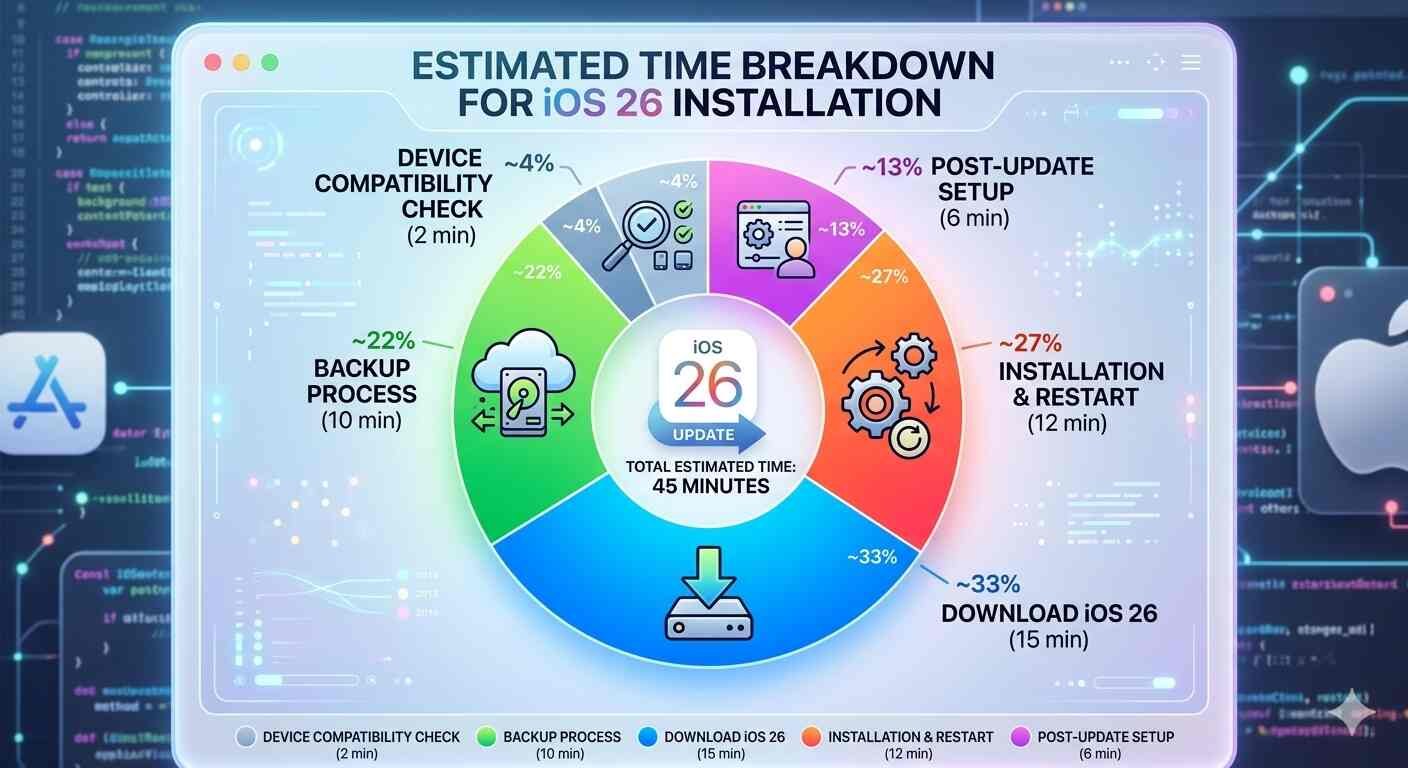
The installation process requires between 20 and 45 minutes to complete, which depends on two factors: your internet speed and your device model.

Read Dive is a leading technology blog focusing on different domains like Blockchain, AI, Chatbot, Fintech, Health Tech, Software Development and Testing. For guest blogging, please feel free to contact at readdive@gmail.com.