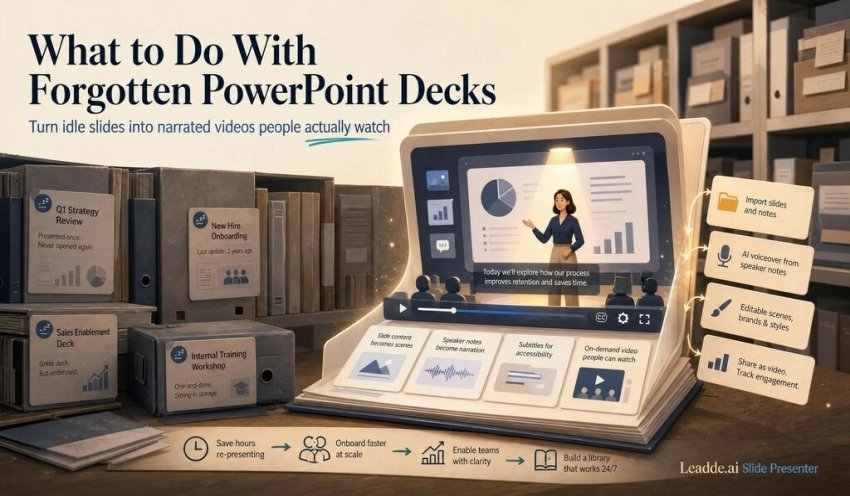
Every team has a shared drive full of finished slide decks that will never be opened again. The quarterly product walkthrough, the onboarding deck a colleague spent two days perfecting, the training slides from the workshop nobody recorded. They were polished, presented once to a room of fifteen people, and then archived. The work is done; the value mostly evaporated the moment the meeting ended.
I find this strange, because a deck is one of the few documents in a company that is already structured for explanation. It has a sequence, a narrative arc, and usually speaker notes that capture exactly what someone meant to say. And yet that asset sits idle, useful only to the handful of people who happened to be in the original room.
The Real Cost of a Presentation That Only Lives Once
The instinctive response is “just send the file around.” But a deck without a presenter is a thin artifact. Bullet points are shorthand for a spoken explanation; without the voice that was supposed to accompany them, half the meaning is missing. Anyone who has tried to learn something from a stranger’s slides knows the feeling of staring at three words on a slide and wondering what the author actually meant.
So the deck either gets re-presented live — which means scheduling the author’s time again and again — or it gets forwarded and quietly ignored. Both outcomes waste the work that went into building it. For onboarding, sales enablement, and internal training especially, this is a recurring tax: the same explanation delivered manually, over and over, because the only durable version of it lives in someone’s head.
The frustrating part is that the missing ingredient — the narration — frequently already exists. It’s sitting in the speaker notes pane, where most presenters dump the script they intend to say. That text is rarely read again. It’s there, attached to each slide, waiting.
Turning the Deck Into Something That Speaks for Itself
This is where converting slides into narrated video has quietly become a sensible workflow rather than a gimmick. Instead of re-presenting a deck or letting it rot, you turn it into a self-contained explainer that anyone can watch on their own time, in their own language, without the author present.
One platform built around this is Leadde.ai, an AI video tool that turns static documents into structured, narrated videos. Its Slide Presenter is the relevant piece here: it takes a PowerPoint or PDF and produces an editable dynamic video rather than a flat screen recording. What I appreciate about the approach is that it doesn’t force a single import mode. You can bring slides in as static images when you want the video to look exactly like the original deck, or import them as fully editable layers when you want to adjust text, reposition elements, or restyle scenes after the fact.
The narration question is handled in the same spirit. The script can be auto-generated, or — and this is the part that closes the loop on idle decks — imported directly from the PowerPoint notes you already wrote. If you were diligent about speaker notes, you’ve effectively already written the voiceover. That’s what makes the PowerPoint to video path feel less like producing a new asset and more like activating one you abandoned.
Where It Actually Earns Its Place
A few use cases are obvious once you start looking for them. Onboarding is the strongest: the deck a manager walks every new hire through can become a video each hire watches before their first day, freeing the manager from repeating the same talk. Sales enablement is similar — a product overview deck becomes a sharable asset reps send to prospects who couldn’t attend the call. And internal training decks, the ones that justified a half-day workshop, become an on-demand library that new team members work through at their own pace.
In each case the math is the same. You spend twenty minutes converting an existing deck once, and you stop spending an hour re-presenting it every month.
Where It Falls Short — and Where It Doesn’t Belong
This is not a universal solution, and pretending otherwise sets people up for disappointment. AI presenters have improved a great deal, but they still read as synthetic on close attention; for a keynote or a high-emotion pitch where presence is the point, a real human on camera wins every time. This format is for explanation, not persuasion that depends on charisma.
Output quality also tracks input quality closely. A deck with sloppy notes produces a sloppy script, and a deck built on dense charts, intricate diagrams, or data-heavy tables translates poorly to video — those slides were designed to be paused over, not narrated past. Brand-perfectionists should temper expectations too; the editing is genuinely flexible, but it won’t reproduce a bespoke motion-graphics treatment a production studio would deliver.
If you have a deck gathering dust right now, the low-risk test is straightforward: pick one with decent speaker notes, run it through the free tier, and see whether the narrated version says what you would have said in the room. That single experiment tells you more than any feature list.
Written by a productivity and AI-tools writer who spends an unreasonable amount of time auditing other people’s shared drives.

Read Dive is a leading technology blog focusing on different domains like Blockchain, AI, Chatbot, Fintech, Health Tech, Software Development and Testing. For guest blogging, please feel free to contact at readdive@gmail.com.