Turning a video into readable text used to mean hours spent pausing, rewinding, and typing every word by hand. Today, AI transcription does the same job in minutes, and the gap between old and new methods has become impossible to ignore.
Whether you are a student converting a lecture into notes, a podcaster building a blog post, or a marketer repurposing webinar footage, choosing between automatic transcription and traditional, human-typed transcription affects your speed, cost, and accuracy. This guide compares both methods directly, using video to text conversion as the focus, so you can decide which approach actually fits your workflow.
Key Takeaways
- AI video to text conversion is dramatically faster than traditional transcription, often completing in minutes what used to take hours.
- Cost differs significantly, since many AI tools offer free or flat-rate transcription compared with ongoing per-minute fees for human services.
- Accuracy is close to human-level on clear audio, but traditional transcription still holds an edge on noisy recordings or highly specialized terminology.
- Tools like SoundWise.ai add practical extras by default, including automatic speaker identification, timestamps, and multi-language support.
- The right choice depends on your specific content: everyday videos and podcasts suit AI transcription well, while legal or highly technical recordings may still call for a human transcriber.
How Traditional Transcription Actually Works
Before automated tools existed, transcription meant one of two things: doing it yourself, or paying someone else to do it. A human transcriber listens to a recording, types what they hear, and manually adds punctuation, timestamps, and speaker labels where needed. For a single hour of audio or video, this typically takes a skilled transcriber three to four hours to complete accurately.
Professional transcription services charge accordingly, often billing per audio minute rather than per project. That per-minute pricing adds up quickly for anyone working with regular video content, like a weekly podcast or a series of recorded training sessions.
How AI Video to Text Conversion Works
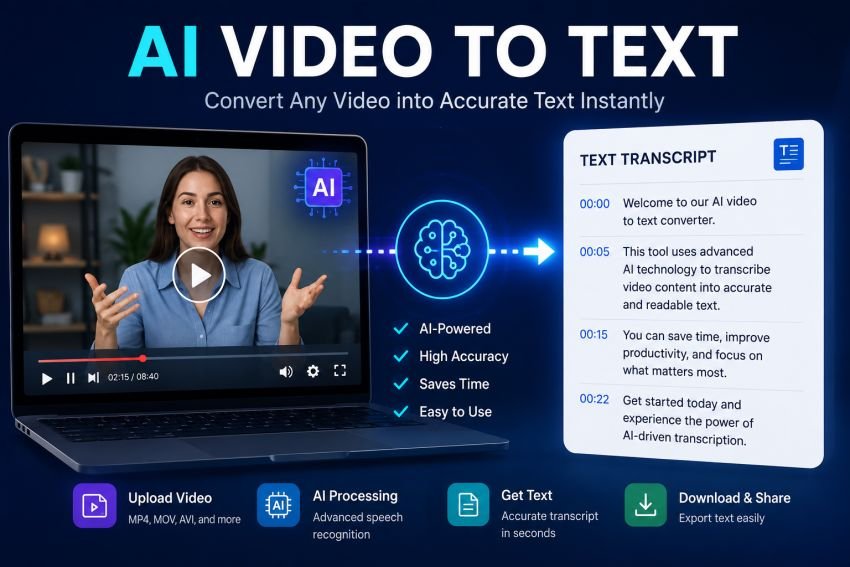
AI transcription tools use automatic speech recognition, trained on large volumes of spoken language, to convert audio directly into written text. Instead of a person listening and typing, software analyzes the audio waveform, identifies words and phrases, and outputs a formatted transcript, usually within minutes rather than hours.
Modern tools have pushed accuracy close to human-level performance on clear audio. SoundWise.ai, for example, is a browser-based video to text platform that processes files directly on the user’s device using a local AI model, reporting accuracy up to 99.8 percent on clear recordings. Because processing happens locally rather than uploading files to a remote server, sensitive recordings never leave the user’s device, which matters for legal professionals, researchers, and anyone handling confidential material.
Side-by-Side Comparison
| Factor | Traditional Transcription | AI Video to Text |
| Speed | 3 to 4 hours per hour of audio | Minutes per hour of audio |
| Cost | Per-minute fees, often ongoing | Often free or flat-rate |
| Accuracy on clear audio | Very high, human judgment | Close to human level (up to 99.8% on some tools) |
| Accuracy on noisy audio or accents | More reliable | Can require manual correction |
| Speaker identification | Manual, added by the transcriber | Often automatic |
| Privacy | Depends on the service’s data handling | Local processing keeps files on-device on some platforms |
| Scalability | Limited by transcriber availability | Handles high volume without added staff |
Where AI Transcription Has a Clear Edge
A few advantages explain why so many creators and businesses have shifted toward automated tools.
- Speed. A one-hour video can be transcribed in a few minutes instead of a few hours, which matters enormously for anyone working on a publishing schedule.
- Cost. Many AI tools, including SoundWise.ai, offer unlimited free transcription with no per-minute charge, compared with ongoing fees from a professional transcription service.
- Language coverage. SoundWise.ai supports more than 90 languages, letting a single tool handle content that would otherwise require multiple specialized human transcribers.
- Built-in extras. Automatic speaker identification, timestamps, and multiple export formats are usually included by default, rather than billed as add-ons.
Where Traditional Transcription Still Has an Advantage
AI transcription is not automatically the better choice in every situation.
- Heavy background noise or overlapping speech. Human transcribers are still generally more reliable when audio quality is poor or several people talk over each other.
- Highly specialized or unusual terminology. Legal, medical, or technical jargon can trip up automated models more than a subject-matter-familiar human transcriber.
- Strong accents or unclear speech. While AI accuracy has improved sharply, it can still make more mistakes than a human listener on non-standard speech patterns.
- Legal or court-admissible transcripts. Some formal or legal contexts specifically require a certified human transcriber rather than an automated output.
Case Study: From Podcast Recording to Blog Post
Consider a podcast host who records a 45-minute weekly show and wants to turn it into a blog post for SEO purposes. Using a traditional transcription service, that single recording would take roughly two to three hours to transcribe manually, plus the cost of a per-minute service fee, before any editing even begins.
Using an AI Video to text tool like SoundWise.ai, the same 45-minute recording can be uploaded directly in the browser and converted to text within minutes, with speaker labels already applied for the host and any guests. The writer can then focus their time on editing the transcript into a polished article, rather than spending most of their session simply typing out what was said. Over a year of weekly shows, that time saved adds up to dozens of hours that can go toward actual content strategy instead of manual data entry.
How to Use an AI Video to Text Tool
Getting a transcript from a tool like SoundWise.ai generally follows the same simple process across most AI transcription platforms:
- Upload your file. Drag and drop a video or audio file directly into the browser, no software installation required.
- Let the AI process it. The tool analyzes the audio and generates a text transcript, often with automatic speaker labels and timestamps.
- Review and edit. Check the output for any misheard words, especially names, technical terms, or unclear audio sections, and correct them directly in the interface.
- Export in your preferred format. Download the transcript as plain text, PDF, or another supported format, ready for repurposing into subtitles, articles, or documentation.
Because the entire process runs in a standard web browser, there is no learning curve involved, and most files process in a fraction of the time the original recording runs.
Why Video to Text Also Helps with SEO and Accessibility
Beyond saving time, converting video into text creates content that search engines can actually read. A video file alone tells a search engine very little about what is being said inside it, while a full transcript gives it real, indexable text to work with, often improving how a page ranks for relevant search terms.
Transcripts also make content accessible to viewers who are deaf or hard of hearing, and they let anyone skim or search a long recording for a specific section instead of watching the entire thing end to end. For creators publishing regularly, pairing every video with a transcript is a simple habit that pays off in both discoverability and audience reach.
Frequently Asked Questions
Is AI video to text as accurate as human transcription?
On clear audio with minimal background noise, modern AI tools can reach accuracy close to human-level performance, with some platforms reporting figures as high as 99.8 percent. Accuracy drops on noisy recordings, heavy accents, or highly technical vocabulary, where a human transcriber may still perform more reliably.
Is AI transcription free?
Some tools, including SoundWise.ai, offer unlimited free transcription using a local processing model, with an optional paid tier for faster cloud-based processing. This differs from traditional services, which almost always charge per audio minute.
Can AI transcription tools identify different speakers?
Yes. Many AI transcription platforms include automatic speaker identification, labeling different voices in a recording, which is especially useful for interviews, panel discussions, and meetings with multiple participants.
Is my data safe when using an AI transcription tool?
This depends on the specific platform. Some tools process audio locally on the user’s device rather than uploading it to a remote server, which keeps sensitive recordings from ever leaving the device, an important consideration for legal, medical, or confidential content.
When should I still use a traditional human transcriber?
For legal proceedings requiring certified transcripts, recordings with significant background noise or overlapping speech, or highly specialized technical content, a professional human transcriber often remains the more reliable option.
Final Thoughts
Neither AI transcription nor traditional transcription is universally superior, but for the vast majority of everyday video and audio content, automated tools now offer a genuinely practical alternative to the old process of manual typing and per-minute billing.
Testing a tool like SoundWise.ai against your own typical recordings is the simplest way to see how well it performs for your specific use case, whether that is turning lecture recordings into study notes or converting a podcast recording into a full blog post.

Read Dive is a leading technology blog focusing on different domains like Blockchain, AI, Chatbot, Fintech, Health Tech, Software Development and Testing. For guest blogging, please feel free to contact at readdive@gmail.com.