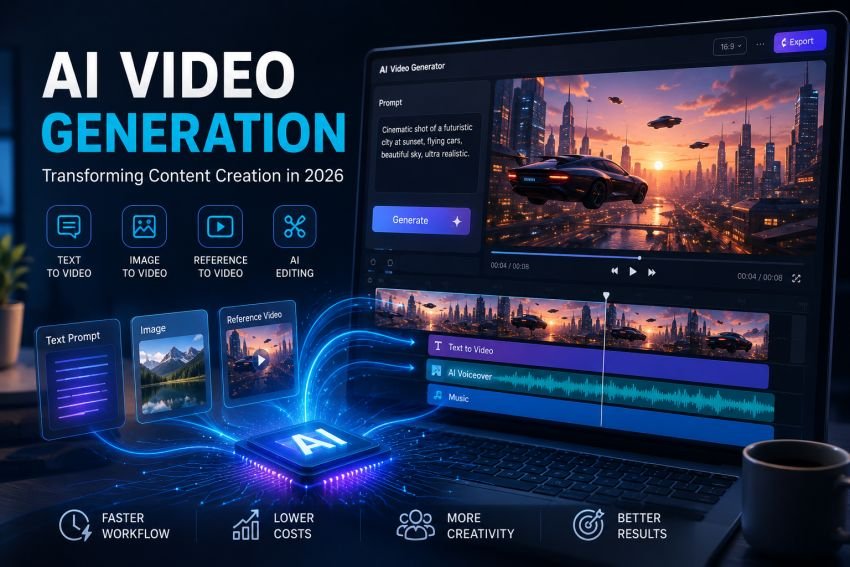
A product demo, a social ad, and an explainer video used to mean three separate shoots, three separate budgets, and a week of turnaround at minimum. That timeline has collapsed. AI video generation now lets a single marketer or small content team produce a short clip from a text prompt, a still image, or a reference file, often within the same afternoon they came up with the idea. This shift is not about replacing every camera crew, but it has genuinely changed who gets to make video content and how fast a rough idea becomes a finished asset.
Key Takeaways
- AI video generation now covers several distinct workflows, text-to-video, image-to-video, reference-to-video, and editing, each suited to a different starting point.
- Ecommerce, social content, early-stage concept videos, and ad testing are the areas where this shift shows up most in everyday content work.
- Choosing a model or workflow should depend on the source material and desired output, not on assuming one tool is universally the right choice.
- Commercial use always warrants a direct review of platform terms, model-specific licensing, and third-party rights before publishing.
Why Video Became the Next Frontier After Images
AI image generation matured first, largely because a single frame is a simpler problem than sixty frames a second that need to move coherently. Once models got good at understanding text prompts and reference images for stills, the next logical step was teaching those same systems to hold a subject, a style, and a scene together across time. Platforms like AI Image Editor now sit at that intersection, offering both image tools and video workflows in one place rather than treating them as separate products.
That matters for a practical reason: most real content projects need both. A marketing team might generate a product visual first, refine it, and then animate it into a short teaser clip, all without switching between five different tools and re-uploading files at every step. For the image side of that process, the Nano Banana 2 AI image generator is one of the model pages available through the platform, alongside options like GPT Image 2 and Seedream 5 Lite, giving a team a starting point before any animation happens.
The Core Workflows Behind Modern AI Video
AI video generation in 2026 generally falls into a few distinct workflows, and knowing the difference helps in picking the right one for a given task rather than assuming one approach fits every job.
- Text-to-video starts from a written prompt describing a scene, mood, and action, useful for early concept testing before any assets exist.
- Image-to-video takes a still image, a product photo, a portrait, an illustration, and adds motion to it, which suits teams that already have strong visuals and just need them to move.
- Reference-to-video uses one or more reference files, an image, a clip, or a style sample, to guide the output toward a specific look or subject consistency across a sequence.
- Video editing tools cover the cleanup work after generation: trimming, adjusting pacing, or preparing a clip for a specific platform’s aspect ratio.
Choosing between these is less about which one is technically superior and more about what you are starting with. A team with strong existing photography leans toward image-to-video. A team starting from a blank page usually starts with text-to-video to test concepts cheaply before committing to a direction.
Where This Actually Shows Up in Content Work
The shift is visible across a handful of concrete use cases that have moved from “nice to have” to standard practice for many content teams.
- Ecommerce and product marketing. A flat product photo can become a short rotating or lifestyle-context clip without a physical reshoot, useful for testing multiple ad variations quickly before spending on production.
- Social media and short-form content. Thumbnails, teaser clips, and short hooks for platforms that reward frequent posting benefit from a faster generation-to-publish cycle than traditional video production allows.
- Explainer and concept content. Early-stage product or pitch videos can be roughed out from a script and a few reference images, giving a team something to react to and refine before investing in a full production.
- Poster and ad concept work. Static concepts can be generated, reviewed, and then animated only once a direction is approved, cutting down on wasted production time on ideas that do not survive an initial review.
None of this eliminates the need for human judgment. A generated clip still needs someone deciding whether the pacing works, whether the message lands, and whether the output is actually usable for the intended purpose.
Choosing an Image Model or Video Workflow for the Task
A common mistake is assuming there is one universally correct model or workflow for every project. In practice, the right choice depends on the source material, the level of control needed, and how the output will be reviewed before publishing.
| Starting Point | Likely Workflow | What to Check Before Using It |
| A written concept, no existing visuals | Text-to-video | How closely the output needs to match a specific brand look |
| An existing product photo or illustration | Image-to-video | Whether the model preserves fine detail from the source image |
| A specific character, product, or style to stay consistent | Reference-to-video | How many reference files the workflow supports |
| Raw or rough visual assets | Background removal, upscaling, then generation | Whether cleanup is needed before the asset is production-ready |
For image generation and editing specifically, the choice between available model pages like Nano Banana 2, GPT Image 2, and Seedream 5 Lite comes down to the specific output needed, the source assets on hand, and how much manual refinement a team expects to do after generation, rather than treating any single model as the default choice for every project.
Practical Considerations Before Publishing
A few habits separate teams that use AI-generated video well from teams that run into avoidable problems later.
- Review commercial use terms directly. Licensing details vary by platform and by the specific model used, so checking platform terms and any model-specific licensing before using generated content commercially avoids surprises later.
- Consider third-party rights. Trademark, copyright, and likeness considerations apply to AI-generated visuals the same way they apply to traditionally produced content, particularly for anything resembling a real person, brand, or existing copyrighted work.
- Keep a human review step. Automated generation speeds up the first draft, but a review pass for accuracy, brand fit, and message clarity remains part of a responsible publishing workflow.
- Match the tool to the task, not the trend. The newest model is not automatically the right one for a given project. Matching the workflow to the actual source material and desired output tends to produce more consistent results than defaulting to whatever released most
Final Thoughts
AI video generation has moved from an experimental novelty to a genuine part of how content teams, marketers, and creators produce visual work in 2026. The tools have gotten faster and more capable, but the fundamentals of good content work, knowing what you are trying to say and reviewing the result before it goes out, have not changed. Platforms that bring image and video workflows together in one place simply remove some of the friction between having an idea and seeing it through to a finished asset.

Read Dive is a leading technology blog focusing on different domains like Blockchain, AI, Chatbot, Fintech, Health Tech, Software Development and Testing. For guest blogging, please feel free to contact at readdive@gmail.com.