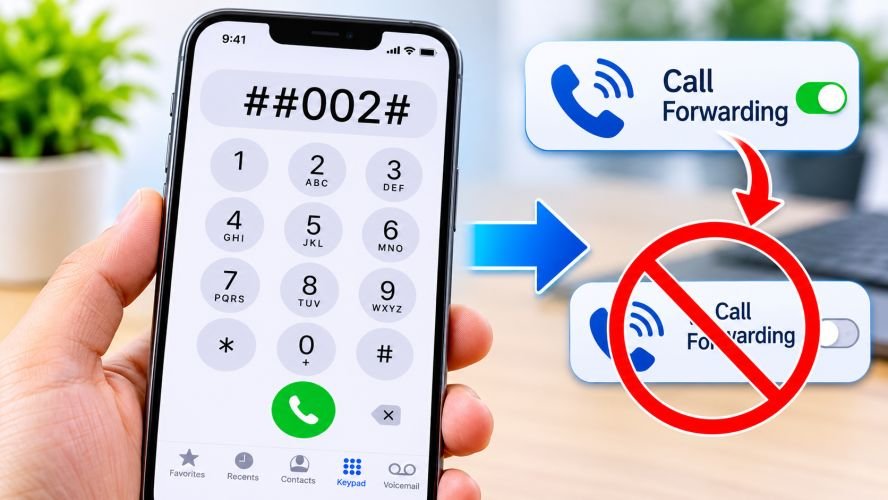
If you have seen the ##002# code online, you may wonder what happens when you dial it on your iPhone. The code is associated with mobile network call forwarding, not a hidden iPhone feature. On supported networks, it can deactivate call forwarding settings. However, its behavior depends on your mobile carrier and network. Understanding the difference between ##002# and <002> can help you avoid confusion, manage your calls, and recognize potentially misleading advice about iPhone security.
What Is the ##002# Code on iPhone?
The ##002# code is a mobile network service code used to erase call forwarding settings on supported GSM-based networks.
Call forwarding is a service that redirects incoming calls to another phone number. For example, you might forward calls to your work phone when you are unavailable.
Depending on your carrier, call forwarding can include several situations:
-
Unconditional forwarding: Sends all incoming calls to another number.
-
Busy forwarding: Redirects calls when your line is busy.
-
No-answer forwarding: Redirects calls when you do not answer.
-
Unreachable forwarding: Redirects calls when your phone is switched off or outside network coverage.
The ##002# code is designed to cancel all types of call forwarding supported by the network. However, not every carrier accepts this code.
Important: This code does not remove spyware, block hackers, prevent phone tracking, or improve your iPhone’s security. Its purpose relates to call forwarding.
What Does <002> Mean on iPhone?
The string <002> is not a recognized standard iPhone dial code for managing call forwarding.
It is important not to confuse it with ##002#. The two strings are different:
| Code | Meaning |
|---|---|
##002# |
Deactivates supported call forwarding services |
<002> |
Not a standard iPhone network service code |
*#21# |
Checks certain call forwarding settings on supported networks |
##21# |
Deactivates unconditional call forwarding on supported networks |
If you found <002> in a website, message, or social media post, it may be a formatting error or an incomplete reference. Do not assume it performs the same function as ##002#.
What Happens When You Dial ##002# on an iPhone?
When you enter ##002# in your iPhone’s Phone app and tap the Call button, your iPhone may send a service request to your mobile carrier.
If the carrier supports the code, it processes the request and may display a confirmation message.
Here is what can happen:
-
Open the Phone app on your iPhone.
-
Select the Keypad tab.
-
Enter
##002#exactly as written. -
Tap the Call button.
-
Wait for your carrier’s response.
-
Read the confirmation or error message.
If the network accepts the command, supported call forwarding settings may be removed.
However, the result depends on your carrier. You might receive an error, an unsupported-code message, or no useful response.
Remember: The code does not change your iPhone’s operating system or erase personal information. It sends a request to the mobile network.
Does ##002# Work on Every iPhone?
No. The iPhone model is not the main factor. Your mobile carrier and its network services determine whether the code works.
Apple explains that call forwarding support depends on the cellular network. Its instructions also distinguish between GSM and CDMA service. Apple Support
Here is what iPhone users should understand:
-
An iPhone connected to a compatible GSM-based network may support standard forwarding codes.
-
Some carriers use different codes for managing call forwarding.
-
Certain carriers manage forwarding through their own settings or customer support.
-
Dual-SIM users should check the correct cellular line.
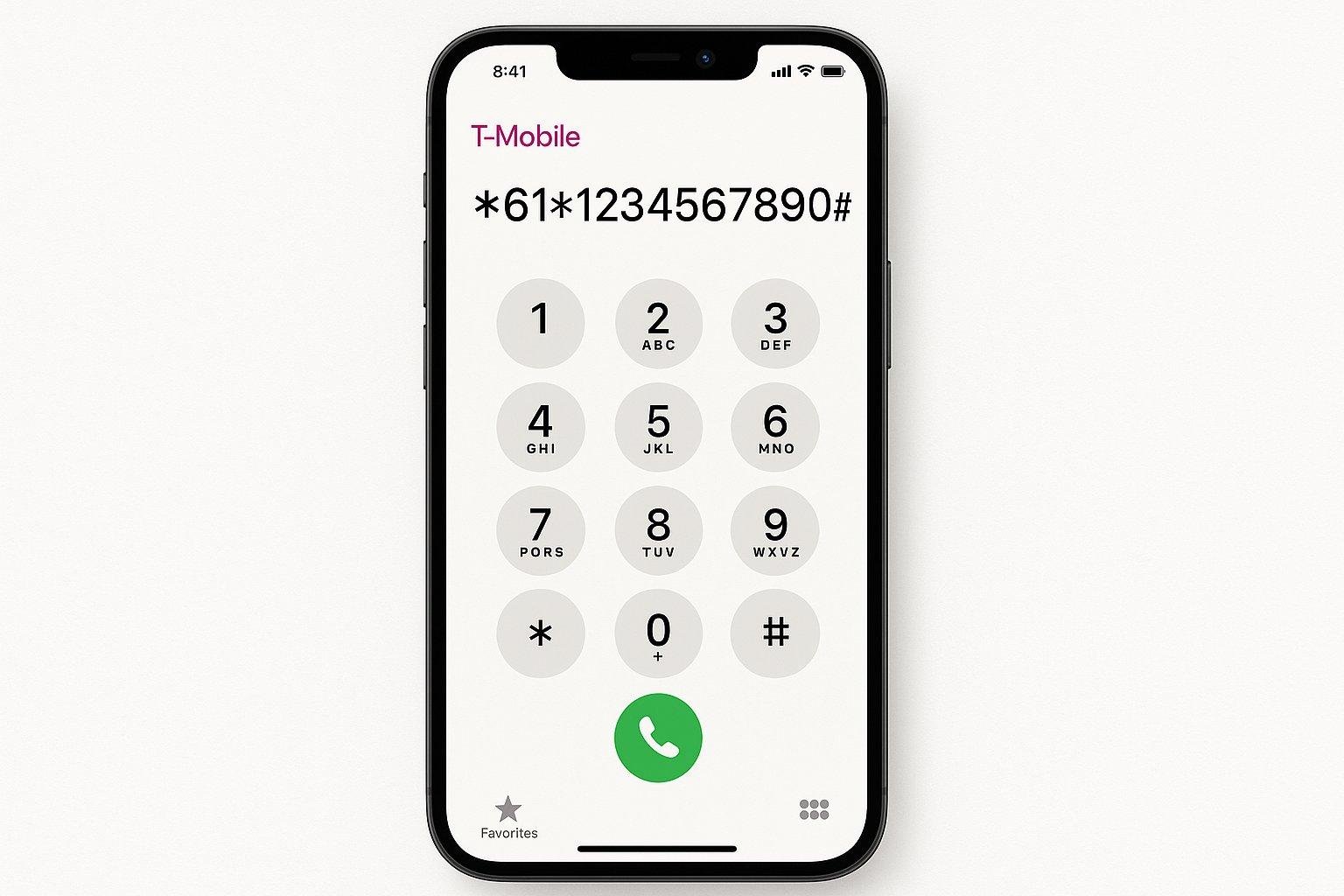
For example, T-Mobile publishes ##004# to reset call forwarding to its default settings. It also lists separate codes for disabling different forwarding conditions.
Does the Code Work on iPhone 13, 14, 15, 16, and 17?
The code is not limited to a particular iPhone generation.
Whether you use an iPhone 13, iPhone 14, iPhone 15, iPhone 16, or iPhone 17, compatibility depends mainly on your carrier.
Updating iOS does not automatically make an unsupported network code work.
How to Check Call Forwarding Settings on an iPhone
You do not always need a dial code to manage call forwarding. Apple provides a built-in setting for supported cellular services.
Follow these steps:
-
Open Settings on your iPhone.
-
Select Apps.
-
Tap Phone.
-
Select Call Forwarding.
-
Check whether call forwarding is enabled.
-
If enabled, review the forwarding destination and turn it off if you no longer need it.
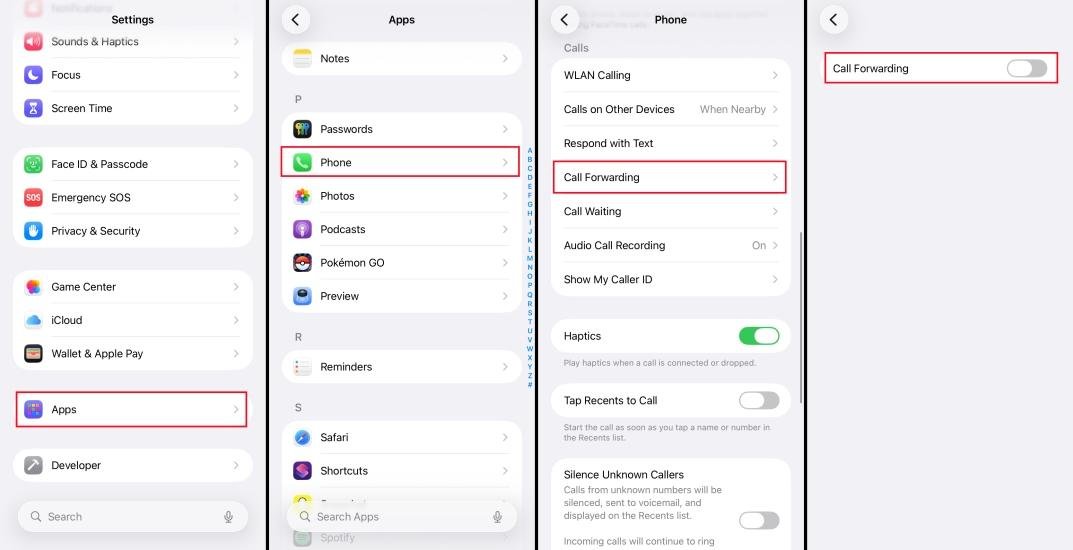
If you use Dual SIM, select the correct phone line before checking its settings.
Apple also notes that you must be within cellular network range when setting up call forwarding. Some conditional forwarding services require assistance from your carrier.
Important: The iPhone setting may not show every carrier-managed forwarding condition. Contact your carrier if you need to check busy, unanswered, or unreachable call forwarding.
What Is the Difference Between ##002#, ##21#, and *#21#?
These codes look similar, but they have different purposes on networks that support them.
| Code | General purpose |
|---|---|
##002# |
Erases all supported call forwarding settings |
##21# |
Deactivates unconditional call forwarding |
*#21# |
Checks unconditional call forwarding status |
##61# |
Deactivates no-answer forwarding |
##62# |
Deactivates unreachable forwarding |
##67# |
Deactivates busy forwarding |
##004# |
Resets supported conditional forwarding settings |
These are network service codes, not universal iPhone shortcuts. Their availability and exact behavior depend on your carrier.
For example, T-Mobile officially documents several of these individual forwarding codes and uses ##004# for resetting forwarding settings.
Is It Safe to Dial ##002# on an iPhone?
The code itself is a call-forwarding command. However, you should understand what it changes before using it.
If your carrier supports it, dialing the code can remove forwarding arrangements that you intentionally configured.
For example, you might have forwarded business calls to another number while traveling. Removing that forwarding could cause calls to stop reaching the alternate number.
Consider these points before using it:
-
Confirm that your carrier supports the code.
-
Check whether you currently use call forwarding.
-
Avoid entering codes supplied by unknown callers.
-
Never share verification codes or account passwords with strangers.
-
Contact your carrier if you receive an unexpected forwarding notification.
Can ##002# Protect Your iPhone From Hackers?
No. This is one of the most common misunderstandings about the code.
The ##002# command does not scan your iPhone for malicious software. It does not remove spyware, detect hackers, block location tracking, or protect your Apple Account.
Call forwarding and device security are different things.
If you suspect someone has accessed your iPhone, review your Apple Account devices, change your password if necessary, and check your account security settings.
If you suspect unauthorized call forwarding, ask your carrier to review the forwarding settings on your mobile line.
Why Is ##002# Not Working on Your iPhone?
Sometimes users enter the code correctly but receive an error or no response.
Several reasons may explain this:
1. Your carrier does not support the code.
Some networks use different call forwarding commands. Check your carrier’s official support instructions.
2. Your cellular service does not support the feature.
Network technology, account restrictions, and service availability can affect whether a code works.
3. You selected the wrong SIM.
If your iPhone has two active cellular lines, check the correct line and its forwarding settings.
4. Your network connection is unavailable.
Service codes require communication with your mobile network. Try again when you have a stable cellular connection.
5. Your carrier manages forwarding separately.
Some providers require you to use their app, account portal, or customer support instead of a general network code.
If the code continues to fail, do not keep trying random combinations. Contact your carrier for the correct instructions.
How Do US Mobile Carriers Handle Call Forwarding?
US mobile carriers do not all use the same forwarding commands.
For example, T-Mobile publishes specific GSM-style service codes, while Verizon documents its own star-code system.
| Carrier | Published guidance |
|---|---|
| T-Mobile | Uses codes such as ##21#, ##61#, ##62#, and ##67# |
| Verizon | Uses *72 to enable immediate forwarding and *71 for conditional forwarding |
| AT&T | Check the instructions for your specific wireless plan and device |
T-Mobile documents ##004# as its conditional forwarding reset code.
Verizon documents *72 and *71 for enabling different forwarding services. Its support page advises customers to contact support if the codes do not work. Verizon
These examples show why iPhone users should not assume that ##002# works identically across every US network.
Frequently Asked Questions
1. What does ##002# do when you dial it on an iPhone?
The ##002# code requests the removal of supported call forwarding settings from your mobile network. It does not reset your iPhone or delete personal information. Its availability depends on your carrier.
2. Does ##002# disable call forwarding?
Yes, on supported networks, it can deactivate all supported call forwarding types. However, some carriers use different commands, so check your provider’s instructions before relying on it.
3. Is <002> the same as ##002#?
No. <002> is not a recognized standard iPhone call forwarding code. The ##002# sequence is the network service code associated with canceling supported call forwarding settings.
4. Can ##002# tell me if someone is spying on my iPhone?
No. It does not detect spyware, hackers, or unauthorized access. It only relates to call forwarding on compatible mobile networks. Check your Apple Account security settings if you suspect unauthorized access.
5. Does ##002# work without an internet connection?
The command uses your cellular network rather than a regular internet connection. However, you generally need an active cellular service connection for the carrier to process it.
Conclusion
The ##002# code is a mobile network command associated with canceling supported call forwarding services. It can help iPhone users manage call redirection, but its availability depends on the carrier. The <002> string is not a recognized equivalent. Before dialing any unfamiliar service code, check your provider’s instructions. Remember that call forwarding management is not the same as protecting your iPhone from hackers or spyware.

Read Dive is a leading technology blog focusing on different domains like Blockchain, AI, Chatbot, Fintech, Health Tech, Software Development and Testing. For guest blogging, please feel free to contact at readdive@gmail.com.