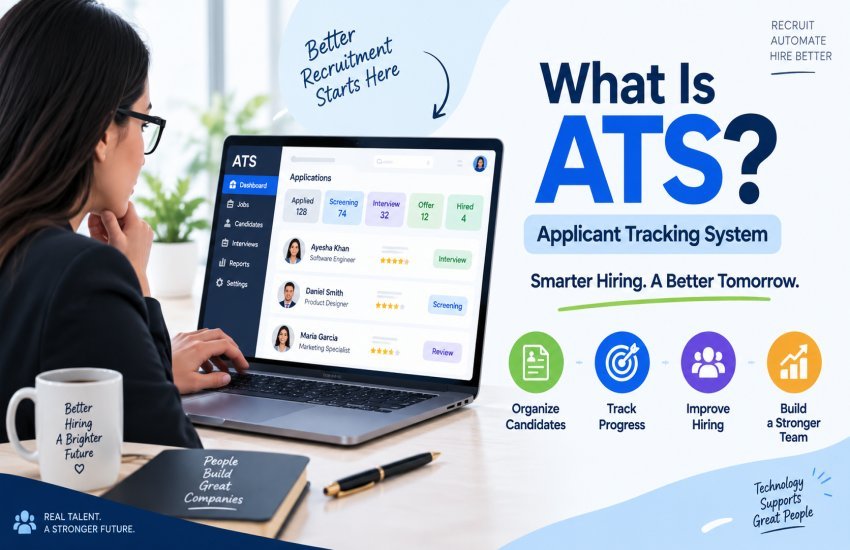
What Is ATS

What Is ATS (Applicant Tracking System)? A Complete Guide for 2026–2027

Rate this post

Introduction

Hiring has changed dramatically over the past few years. Companies no longer manage recruitment with stacks of printed resumes, spreadsheets, long email chains, and separate calendars. As the number of applications grows and hiring teams work across different locations, businesses need technology that can keep the entire recruitment process organized.

Table of Contents

This is where an Applicant Tracking System (ATS) becomes important.

An Applicant Tracking System is recruitment software that helps organizations collect applications, organize candidate information, manage job postings, screen applicants, schedule interviews, communicate with candidates, and track hiring progress from one central platform.

Modern ATS platforms can do much more than simply store resumes. Depending on the product, they may connect with job boards, career websites, HR systems, assessment platforms, calendars, background-check services, analytics tools, and recruitment marketing systems.

According to Jobscan’s 2025 research, an ATS was detectable at 97.8% of Fortune 500 companies, or 489 out of 500 organizations. Its research also found that the figure was 98.4% in 2024. The remaining companies may use proprietary systems that are not detectable externally.

That level of adoption shows how important recruitment technology has become for large organizations.

But what exactly does an ATS do, how does it work, how does AI affect modern hiring, and what should businesses and job seekers know before using one?

Let’s break it down.

What Is an Applicant Tracking System (ATS)?
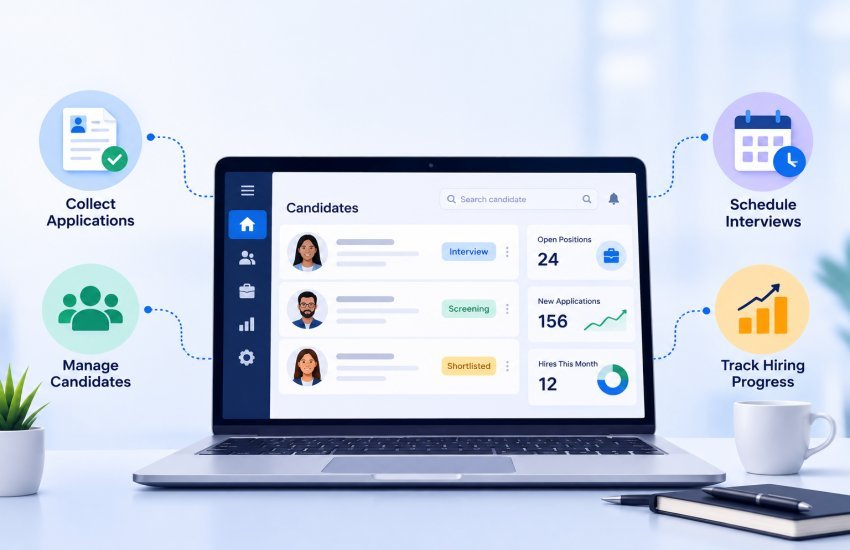
What Is an Applicant Tracking System (ATS)

An Applicant Tracking System is software designed to organize and manage the recruitment process.

Think of it as a central workspace for hiring.

Instead of keeping one candidate’s resume in an email inbox, interview notes in a spreadsheet, feedback in a messaging application, and application status somewhere else, an ATS brings much of this information together.

A typical system can help recruiters:

  • Create and publish job vacancies
  • Collect applications
  • Store candidate profiles
  • Parse resume information
  • Search candidate databases
  • Filter applicants according to defined criteria
  • Schedule interviews
  • Communicate with applicants
  • Collect interviewer feedback
  • Track hiring stages
  • Manage offers
  • Generate recruitment reports
  • Maintain records for compliance and auditing

Workday describes an ATS as a central database that supports recruiters and employers throughout the hiring journey, including job posting, application collection, screening, interview management, and candidate evaluation.

The exact capabilities differ between vendors. A small company may need only job posting, resume management, interview scheduling, and basic reporting, while a global organization may require complex workflows, integrations, analytics, permissions, automation, and multilingual career sites.

ATS Is More Than a Resume Scanner

One of the biggest misconceptions about an Applicant Tracking System is that it is simply a computer program that reads resumes and automatically rejects people.

That’s an oversimplification.

An ATS can parse resumes and make candidate information searchable. It can also support screening rules, ranking, workflows, searches, and automated actions depending on how the employer configures the system.

However, not every ATS works in the same way, and there is no universal ATS process or universal “ATS score.”

Some systems primarily function as recruitment databases and workflow tools. Others provide more advanced matching and AI-supported recommendations.

This distinction matters because job seekers often hear that an ATS automatically rejects every resume that does not contain a particular keyword. In reality, the exact screening process depends on the employer, the ATS configuration, the application questions, and other recruitment tools connected to the system.

Why Did Businesses Start Using ATS Software?

Before digital recruitment systems became common, hiring teams had to manage applications manually.

Imagine a company receiving 1,000 applications for one position.

A recruiter would need to:

  1. Collect resumes.
  2. Open each document.
  3. Record candidate information.
  4. Compare qualifications.
  5. Contact shortlisted applicants.
  6. Schedule interviews.
  7. Record interview feedback.
  8. Track rejected candidates.
  9. Keep documents organized.
  10. Prepare reports.

Doing all of this manually becomes difficult very quickly.

An ATS reduces this administrative burden by creating a structured recruitment workflow.

Modern platforms can also integrate with job boards, career pages, assessment tools, HR systems, and calendars. Workday notes that current ATS platforms can support job-board distribution, resume parsing, workflow automation, interview coordination, regulatory safeguards, analytics, career portals, and mobile access.

How Does an Applicant Tracking System Work?

Although individual platforms work differently, the recruitment process commonly follows a similar pattern.

Step 1: The Employer Creates a Job

The recruitment team creates a job description containing information such as:

  • Job title
  • Responsibilities
  • Required skills
  • Preferred qualifications
  • Experience requirements
  • Location
  • Salary information where applicable
  • Employment type
  • Application questions

The employer may then publish the vacancy through the company’s career site and multiple external job boards.

Step 2: Candidates Submit Applications

Candidates complete an online application and typically upload a resume.

Depending on the company, applicants may also provide:

  • Cover letters
  • Portfolio links
  • Certifications
  • Work authorization information
  • Education history
  • Skills
  • Screening-question responses

The ATS stores this information in a candidate record.

Step 3: Resume Parsing

Resume parsing converts information from an uploaded document into structured fields.

For example, the system may identify:

Candidate: Sarah Khan
Experience: Software Developer
Skills: Python, JavaScript, SQL
Education: BS Computer Science
Location: New York
Previous Employer: ABC Technologies

Instead of forcing recruiters to read every document from scratch, the ATS can make these details searchable.

Step 4: Candidate Screening

Recruiters can establish screening criteria based on the requirements of a position.

For example, a software company might search for candidates with:

Python + SQL + 3 years of software development experience

Another employer might require a particular certification or work authorization.

Some systems can automate parts of this process, while others primarily help recruiters search and organize candidate information.

Step 5: Recruiters Review Candidates

Qualified candidates can move to the next stage.

Recruiters may review:

  • Resume
  • Application responses
  • Work history
  • Skills
  • Assessments
  • Interview notes
  • Communication history

This is where human judgment remains extremely important.

Step 6: Interviews Are Scheduled

Many ATS platforms connect with calendars and scheduling tools.

Instead of sending dozens of emails such as:

“Are you available Tuesday at 2 PM?”

the system may allow candidates to select from available interview slots.

Step 7: Interview Feedback Is Collected

Hiring managers and interviewers can submit structured feedback through the ATS.

For example:

Evaluation Area Rating
Technical skills 4/5
Communication 5/5
Problem solving 4/5
Relevant experience 5/5
Culture/team fit 4/5

Structured feedback can make comparisons easier and reduce the risk of important notes being lost in email.

Step 8: Offer and Hiring

Once the company selects a candidate, the ATS may support offer management and handoff to other HR systems.

Depending on the platform, information can then flow into onboarding, payroll, HRIS, or employee-management systems.

Step 9: Candidate Records Are Retained

Candidates who are not selected may remain in the organization’s talent database, depending on company policies and applicable privacy and retention requirements.

This can help recruiters identify previously considered candidates when similar positions become available.

Applicant Tracking System Workflow at a Glance

Recruitment Stage What the ATS Can Do
Job creation Build and manage job postings
Distribution Publish vacancies across selected channels
Application Collect candidate information
Resume processing Extract searchable information
Screening Filter or organize candidates
Communication Send emails and updates
Interviews Schedule meetings
Evaluation Collect structured feedback
Selection Manage candidate stages
Offer Support offer workflows
Reporting Analyze recruitment performance
Record keeping Maintain candidate history

Suggested screenshot: Add a screenshot here showing an ATS candidate pipeline with columns such as Applied → Screening → Interview → Final Interview → Offer → Hired.

Why Applicant Tracking Systems Matter in 2026–2027

The recruitment environment is becoming more complicated.

Companies may receive applications through several channels while recruiting for multiple roles simultaneously. Remote work also means hiring teams may include recruiters and managers in different cities or countries.

At the same time, AI is changing how job descriptions are created, resumes are prepared, candidates are sourced, and applications are evaluated.

An ATS provides the infrastructure needed to organize these activities.

For a small company, the benefit might simply be better organization.

For a large organization, the system can become the central operating platform for talent acquisition.
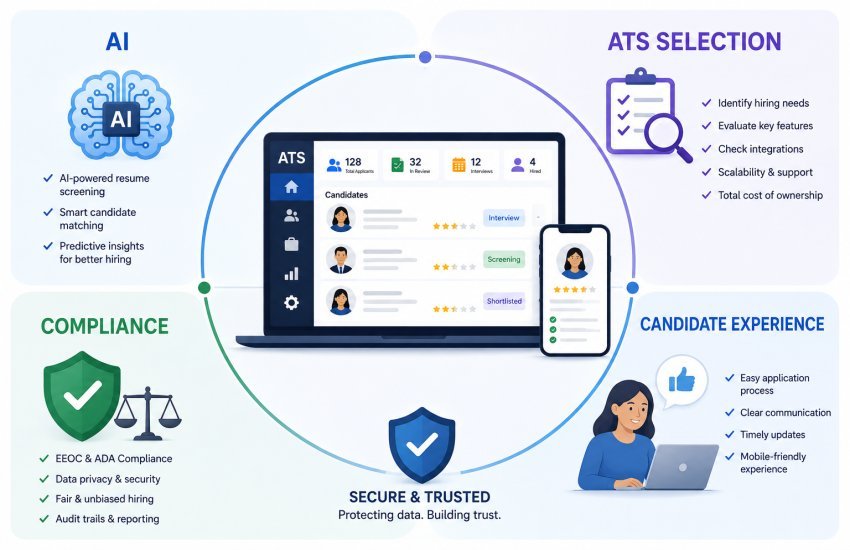
Key Features and Benefits of an ATS

Core Features of a Modern Applicant Tracking System

Not every ATS contains the same features, but the following capabilities are common across modern platforms.

1. Job Posting and Distribution

Recruiters can create a vacancy once and distribute it across selected channels.

This can save repetitive work when a company advertises the same position on multiple job boards.

2. Resume Parsing

Resume parsing extracts structured information from candidate documents.

This allows recruiters to search large applicant databases without manually opening every resume.

3. Candidate Database

An ATS provides a centralized database for applicant information.

Recruiters can search candidates based on fields such as:

  • Skills
  • Experience
  • Location
  • Education
  • Job history
  • Application stage

4. Candidate Pipeline Management

A visual pipeline allows hiring teams to understand where candidates are in the recruitment process.

For example:

Applied → Screening → Assessment → Interview → Final Interview → Offer → Hired

This is particularly useful when several recruiters and hiring managers are working on the same position.

5. Automated Communication

Recruiters can create reusable email templates for common situations.

Examples include:

  • Application confirmation
  • Interview invitation
  • Interview reminder
  • Rejection notification
  • Offer communication
  • Follow-up messages

Automation can save time while maintaining consistent communication.

6. Interview Scheduling

Scheduling tools can coordinate candidate and interviewer availability.

Some platforms can connect with calendars and automatically send meeting invitations.

7. Recruitment Analytics

Reporting dashboards can show information such as:

  • Number of applications
  • Candidates by hiring stage
  • Time to hire
  • Time to fill
  • Source of applicants
  • Interview conversion
  • Offer acceptance
  • Recruitment funnel performance

Analytics can help companies identify bottlenecks.

8. Collaboration

Recruitment rarely involves one person.

An ATS can allow recruiters, hiring managers, interviewers, and other authorized team members to share candidate feedback within one system.

9. Integrations

A modern ATS may connect with:

  • HRIS platforms
  • Payroll systems
  • Job boards
  • Assessment tools
  • Background-check providers
  • Calendar software
  • Video interview platforms
  • Recruitment CRM systems
  • Onboarding software

Integrations reduce duplicate data entry.

10. Career Websites

Some platforms provide branded career pages where candidates can view vacancies and submit applications.

This allows companies to create a more consistent employer-brand experience.

Major Benefits of Using an ATS

Faster Recruitment Administration

Recruiters spend less time moving information between spreadsheets, emails, calendars, and separate systems.

Better Organization

All candidate information can be stored in a structured environment.

Easier High-Volume Hiring

When hundreds or thousands of applications arrive, manual organization becomes extremely difficult.

An ATS can make large candidate pools more manageable.

Better Candidate Visibility

Recruiters can quickly see which candidates have applied, who has been interviewed, who is waiting for feedback, and which positions are still open.

Improved Candidate Communication

Automated confirmations and notifications can reduce communication gaps.

Better Recruitment Reporting

Instead of relying on assumptions, hiring teams can analyze recruitment funnel data.

Improved Collaboration

Hiring managers can review candidate information and provide feedback without relying entirely on email.

Reduced Administrative Work

Automation handles repetitive tasks so recruiters can spend more time on sourcing, interviewing, relationship building, and strategic hiring.

ATS Benefits for Recruiters vs. Candidates

Recruiters Candidates
Centralized applications Easier online application
Automated workflows Application status visibility where offered
Resume search Faster communication
Interview scheduling Online scheduling
Candidate analytics More consistent process
Collaboration Easier interview coordination
Recruitment reporting Digital application records

A good system should benefit both sides. Making recruitment easier for employers should not mean creating an unnecessarily complicated experience for applicants.

How Much Does an Applicant Tracking System Cost?

ATS pricing varies significantly.

Some platforms charge based on:

  • Number of recruiters
  • Number of employees
  • Number of job postings
  • Number of candidates
  • Features
  • Hiring volume
  • Monthly or annual subscriptions

A small organization may find entry-level tools at relatively low monthly prices, while enterprise platforms can cost substantially more.

Therefore, businesses should avoid selecting software based purely on the advertised monthly price.

A better approach is to calculate the total cost of ownership.

Cost Factor Questions to Ask
Subscription What is the monthly or annual price?
Implementation Is setup included?
Integration Will connecting other systems cost extra?
Training Does staff training require additional fees?
Support What level of support is included?
Customization Are custom workflows charged separately?
Data migration Is transferring existing candidates included?
Users Is pricing based on recruiters or employees?

AI, ATS Selection, Compliance and the Candidate Experience

AI, ATS Selection, Compliance and the Candidate Experience

How AI Is Changing Applicant Tracking Systems

AI is becoming one of the biggest changes in recruitment technology.

Modern recruitment platforms may use AI or machine learning to assist with:

  • Resume analysis
  • Candidate matching
  • Job-description creation
  • Candidate sourcing
  • Interview scheduling
  • Candidate communication
  • Recruitment analytics
  • Skills identification
  • Workflow automation

However, AI should not be treated as a replacement for responsible human decision-making.

The National Institute of Standards and Technology’s AI Risk Management Framework is designed to help organizations manage AI-related risks and incorporate trustworthiness considerations into AI systems.

AI-Powered Candidate Matching

Traditional searches might look for exact terms.

For example:

“Project Manager”

AI-supported systems may attempt to understand related skills, experience, and job requirements more broadly.

This can potentially help recruiters find relevant candidates who use different wording on their resumes.

However, companies should validate how a particular vendor’s matching system works rather than assuming that every ATS uses advanced semantic AI.

AI Resume Screening

AI can help identify relevant information from large numbers of applications.

But automated screening has limitations.

A candidate may possess a valuable skill that is not clearly represented in their resume. Similarly, a keyword can appear on a resume without proving meaningful competence.

For this reason, AI recommendations should be treated as decision support rather than unquestionable truth.

Applicant Tracking Systems and Hiring Bias

Technology does not automatically eliminate bias.

An algorithm can reproduce problems that exist in the data, rules, job requirements, or system design.

The U.S. Equal Employment Opportunity Commission states that employers must ensure recruitment and hiring decisions are not based on protected characteristics covered by applicable discrimination laws.

The Department of Justice’s ADA guidance also warns that hiring technologies can create disability discrimination risks. It specifically discusses technologies used to determine whether applicants meet qualifications, conduct assessments, analyze resumes, and support selection.

This means businesses should evaluate ATS and AI tools carefully.

Good Practices for Responsible ATS Use

Companies should:

  • Regularly review automated screening criteria.
  • Test systems for unintended adverse effects.
  • Keep human oversight in important decisions.
  • Make reasonable accommodations available.
  • Avoid unnecessary requirements.
  • Monitor candidate outcomes.
  • Document recruitment policies.
  • Review vendor claims carefully.
  • Protect candidate data.
  • Give authorized staff appropriate training.

An ATS should make hiring more consistent and efficient—not turn recruitment into an invisible black box.

ATS and the Candidate Experience

Recruitment is a two-way relationship.

Candidates are also evaluating the company.

An application process that takes an unreasonable amount of time, asks repetitive questions, or provides no communication can damage the candidate experience.

A strong ATS can improve this experience through:

  • Mobile-friendly applications
  • Clear job information
  • Simple forms
  • Automated confirmation emails
  • Interview scheduling
  • Timely updates
  • Accessible career pages
  • Consistent communication

The goal should not be to automate every interaction.

Instead, automation should remove unnecessary friction while leaving meaningful conversations to people.

Does an ATS Automatically Reject Your Resume?

This is one of the most common questions about ATS technology.

The answer is:

It depends on the employer’s configuration and the technology being used.

Some recruitment workflows include knockout questions or predefined screening criteria that can automatically remove candidates who do not meet specific requirements.

Other ATS platforms primarily store, parse, search, and organize applications, leaving the actual decision to recruiters and hiring managers.

Therefore, the popular idea that every ATS automatically rejects a resume because it lacks a certain keyword is too simplistic.

Modern systems vary considerably.

Workday, for example, describes ATS software as a platform for organizing resumes, screening candidates, managing workflows, coordinating interviews, and collecting feedback rather than defining ATS as one universal automatic rejection mechanism.

Does Every ATS Have an ATS Score?

No.

There is no universal ATS score used by every employer.

Third-party resume optimization websites may provide a percentage or match score, but that score belongs to that particular tool’s methodology.

Job seekers should therefore avoid obsessing over achieving a supposed “90% ATS score.”

The better strategy is to create a clear, truthful resume that accurately reflects relevant skills and experience.

How Job Seekers Can Make a Resume ATS-Friendly

Job seekers do not need to fill their resumes with keywords.

Instead, focus on clarity.

Use Standard Headings

Use familiar sections such as:

  • Summary
  • Work Experience
  • Education
  • Skills
  • Certifications

Match Relevant Job Language Naturally

If a job description genuinely requires “project management,” and you have that experience, using the phrase project management is reasonable.

Don’t add skills you don’t have simply because they appear in the job description.

Avoid Overly Complicated Formatting

Simple formatting is usually easier for software and humans to process.

Use:

  • Clear headings
  • Standard fonts
  • Consistent dates
  • Simple bullet points
  • Readable spacing

Check Your PDF

Many ATS platforms can process text-based PDFs, but scanned or image-only PDFs can create parsing problems.

If an employer specifies a file format, follow the employer’s instructions.

Choosing an ATS, Future Trends and FAQs

How to Choose the Right Applicant Tracking System

Choosing an ATS should start with the organization’s actual recruitment problems.

Don’t buy software simply because it contains the largest feature list.

1. Identify Your Hiring Problems

Ask:

  • Are recruiters spending too much time screening resumes?
  • Are applications being lost?
  • Is interview scheduling slow?
  • Are hiring managers not providing feedback?
  • Is reporting difficult?
  • Are candidates complaining about the application process?

Your answers should determine what features matter.

2. Consider Company Size

A small business hiring 10 people a year does not necessarily need the same system as a multinational company hiring thousands.

3. Examine Integrations

Check whether the ATS connects with the tools your organization already uses.

4. Test the Candidate Experience

Don’t only test the recruiter dashboard.

Apply for a sample job yourself.

Ask:

Is the application easy?

Does it work on mobile?

Are the questions necessary?

Is communication clear?

5. Review Security and Privacy

Candidate information can include sensitive personal and professional data.

Ask vendors about:

  • Data storage
  • Access controls
  • Encryption
  • Data retention
  • Authentication
  • Compliance
  • Vendor subprocessors
  • Data deletion procedures

6. Evaluate AI Features Carefully

If AI is involved, ask:

  • What exactly does the AI do?
  • What data does it use?
  • Can recruiters override recommendations?
  • How is performance tested?
  • How are bias risks monitored?
  • Can the vendor explain the system’s limitations?

ATS Comparison: Basic vs. Enterprise

Feature Basic ATS Enterprise ATS
Job posting Yes Yes
Resume storage Yes Yes
Resume parsing Usually Advanced
Candidate pipeline Yes Advanced
Interview scheduling Often Advanced
Reporting Basic Advanced
AI capabilities Limited/varies Often extensive
Integrations Limited Extensive
Custom workflows Limited Extensive
Multiple locations Limited Strong
Permissions Basic Advanced
Compliance tools Varies Usually stronger
Support Standard Dedicated options

The “best” ATS is therefore not necessarily the most expensive one. It is the one that matches the organization’s recruitment volume, complexity, budget, technical environment, and candidate experience goals.

What Is the Future of ATS in 2026–2027?

The next generation of Applicant Tracking Systems will likely focus on deeper automation, better skills data, AI-assisted workflows, and stronger integration with broader HR technology.

Skills-Based Hiring

Companies are increasingly interested in what candidates can actually do rather than relying only on traditional credentials.

Future ATS platforms may place greater emphasis on:

  • Skills
  • Certifications
  • Demonstrated experience
  • Assessments
  • Projects
  • Competencies

AI Recruitment Assistants

Recruiters may increasingly use AI assistants to summarize candidate information, draft communication, identify workflow bottlenecks, and answer questions about recruitment data.

Better Candidate Matching

Instead of relying only on exact keyword matches, systems may increasingly use semantic and skills-based matching.

Predictive Analytics

Recruitment teams may use analytics to identify:

  • Hiring bottlenecks
  • High-performing sources
  • Drop-off points
  • Candidate conversion rates
  • Recruitment costs

However, predictive systems should be carefully validated because correlation does not automatically mean causation.

More Human-Centered Automation

The future of recruitment technology is unlikely to be “automate everything.”

Instead, the strongest systems will probably automate repetitive administrative work while giving recruiters better information for human decisions.

Applicant Tracking System vs. Recruitment CRM

These terms are sometimes confused.

An ATS primarily focuses on managing candidates through the hiring process.

A Recruitment CRM focuses more heavily on building relationships with potential candidates, including people who may not have applied for a specific vacancy.

Some modern platforms combine both functions.

ATS Recruitment CRM
Manages applications Builds candidate relationships
Tracks hiring stages Supports talent pools
Stores applicant records Supports candidate engagement
Handles recruitment workflows Focuses on long-term sourcing
Supports selection Supports talent pipelines

For larger organizations, combining ATS and CRM capabilities can create a broader talent acquisition ecosystem.

Applicant Tracking System vs. HRIS

An ATS and HRIS also serve different purposes.

An ATS generally manages recruitment before a person becomes an employee.

An HRIS typically manages employee information after hiring.

The systems can connect so information moves from recruitment into onboarding and employee management.

Common ATS Mistakes Businesses Should Avoid

Choosing Based Only on Price

The cheapest software may become expensive if it requires manual work or lacks necessary integrations.

Buying Too Many Features

More features do not automatically mean better results.

Ignoring Candidates

A recruiter-friendly system can still fail if the application experience is frustrating.

Using AI Without Oversight

AI outputs should be reviewed and monitored.

Failing to Train Recruiters

Even excellent software can perform poorly when users don’t understand how to configure or use it.

Ignoring Data Quality

Incorrect job requirements, duplicate candidate records, and outdated information can reduce the value of analytics and automation.

Real-World Example: How an ATS Can Improve Hiring

Imagine a growing technology company hiring 20 software developers.

Without an ATS, recruiters might receive applications through several job boards and email addresses. Candidate information could become scattered across spreadsheets and inboxes.

With an ATS, the process could look like this:

Job Created

Published Across Selected Channels

Applications Collected

Resume Information Parsed

Recruiter Screening

Technical Assessment

Interview

Hiring Manager Review

Offer

Onboarding

The ATS does not replace the recruiter.

Instead, it provides a structured system that helps the recruiter manage the process.

Key Applicant Tracking System Statistics

Statistic What It Shows
97.8% Fortune 500 companies with a detectable ATS in Jobscan’s 2025 research
98.4% Fortune 500 companies with a detectable ATS in Jobscan’s 2024 research
94% Recruiters/hiring professionals in a Capterra-cited survey who said their ATS/recruiting software positively affected their hiring process

Jobscan’s figures are based on detection of ATS technology through Fortune 500 career pages, so they should be interpreted as technology-detection data rather than proof that every company uses the same type of ATS.

The 94% figure comes from recruitment software research cited in a Recruitive guide, which attributes the statistic to Capterra.

This distinction is important: recruitment statistics can use different methodologies, samples, and definitions, so numbers should not be presented as universal facts about every employer.

Final Thoughts

An Applicant Tracking System has become an important part of modern recruitment because hiring is increasingly data-driven, distributed, and technology-supported.

At its simplest, an ATS organizes applications. At a more advanced level, it can connect job advertising, candidate sourcing, resume processing, screening, interview scheduling, collaboration, analytics, communication, compliance, and onboarding workflows.

For employers, the biggest value is not simply automation. The real value comes from creating a more organized recruitment process where the right information reaches the right people at the right time.

For candidates, understanding how ATS technology works can help remove some of the mystery surrounding online applications. A clear, relevant, truthful, well-structured resume is more useful than trying to manipulate an imaginary universal ATS score.

Looking toward 2026 and 2027, AI will continue changing recruitment technology. However, responsible implementation will matter just as much as technical capability. NIST’s AI Risk Management Framework emphasizes managing AI risks and incorporating trustworthiness considerations into AI systems, while U.S. government guidance makes clear that employers remain responsible for avoiding unlawful discrimination when using hiring technologies.

The best recruitment technology will therefore combine automation with human judgment.

An ATS should help recruiters work faster, but it should also help organizations make better, fairer, more transparent, and more consistent hiring decisions.

Frequently Asked Questions

What does ATS stand for?

ATS stands for Applicant Tracking System. It is software used by employers and recruiters to manage job applications and recruitment workflows.

What does an Applicant Tracking System do?

An ATS can collect applications, store candidate information, parse resumes, manage hiring stages, schedule interviews, support communication, collect feedback, and provide recruitment analytics.

Do all companies use an ATS?

No. However, ATS adoption is particularly high among large organizations. Jobscan’s 2025 research detected ATS technology at 97.8% of Fortune 500 companies.

Does an ATS automatically reject resumes?

Not necessarily. ATS platforms and employer configurations vary. Some recruitment workflows can automatically filter applicants using predefined criteria or knockout questions, while other systems mainly organize and search candidate information.

Does an ATS give every resume a score?

No. There is no universal ATS scoring system used by every employer. Some third-party resume tools provide match scores, but those scores are specific to those tools.

How can I make my resume ATS-friendly?

Use clear headings, standard formatting, relevant job-related terminology, readable text, and accurate information. Avoid keyword stuffing and do not add skills you do not actually possess.

Can small businesses use an ATS?

Yes. ATS software is available for organizations of different sizes. A small company may need only basic job posting, candidate management, scheduling, and communication features, while a large enterprise may need advanced workflows and integrations.

Is AI replacing recruiters?

AI can automate and assist with parts of recruitment, but it does not eliminate the need for human judgment. Recruiters still need to evaluate candidates, interpret context, conduct interviews, make decisions, and ensure hiring practices are appropriate and fair.

Is ATS software the same as HRIS?

No. An ATS generally focuses on recruiting and candidate management, while an HRIS is typically used to manage employee information and HR processes after hiring. The two systems can often be integrated.

What should a company consider before buying an ATS?

Businesses should consider hiring volume, budget, required features, integrations, candidate experience, security, privacy, reporting, AI capabilities, customization, implementation requirements, and vendor support.

Recommended Reference Links

Back To Top