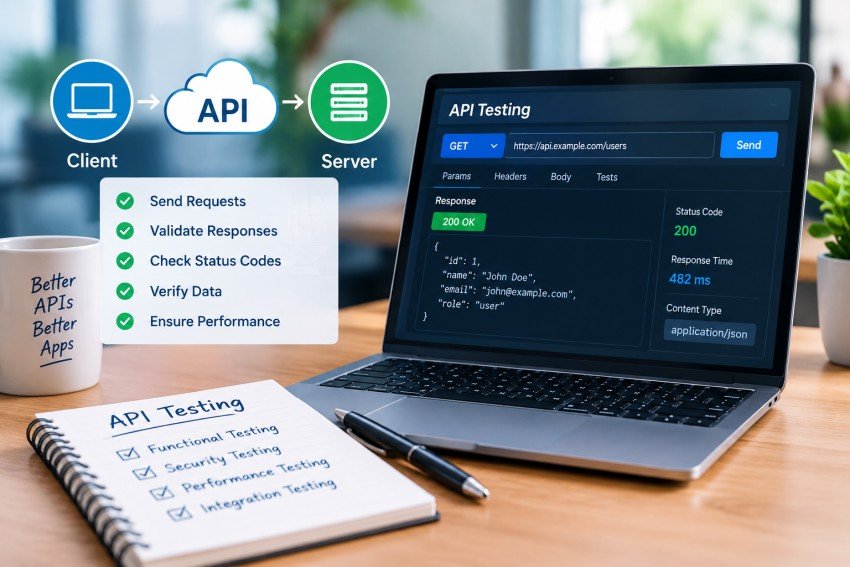
Application Programming Interfaces (APIs) are the connection points that allow applications, services, databases, and third-party platforms to communicate. Whether a customer is logging into an online store, making a payment, checking an order status, or using a mobile application, APIs are often working behind the scenes.
As APIs become more important to modern software, testing them properly has become a critical part of quality assurance. API testing helps teams verify that requests are processed correctly, responses contain the expected information, authentication works, errors are handled properly, and the system remains reliable under different levels of traffic.
According to Postman’s 2025 State of the API Report, 81% of surveyed API professionals identified testing as an API-related activity, while 67% reported using functional and integration testing. Performance testing was reported by 57%, but contract testing was only at 17%. These figures show both the importance of API testing and an opportunity for teams to strengthen less commonly adopted testing practices.
This guide explains How to Test an API from the basics through advanced practices, including API testing types, step-by-step procedures, tools, authentication, security, performance, automation, CI/CD, test data, and common mistakes.
What Is API Testing?
API testing is the process of evaluating an API directly to determine whether it behaves according to its requirements and specification.
Instead of testing an application through buttons, forms, and screens, API testing sends requests directly to endpoints and examines the resulting responses. This makes it possible to validate backend functionality before or without relying on the user interface.
For example, imagine an e-commerce application with an endpoint such as:
GET /api/products/125A tester can send the request and verify several things:
- Does the endpoint return the correct status code?
- Is the product returned in the expected format?
- Are required fields present?
- Are data types correct?
- Is the response time acceptable?
- Does an unauthorized user receive appropriate protection?
- Does the API return a useful error when the product does not exist?
API testing can be performed against REST, SOAP, GraphQL, gRPC, WebSocket-based services, and other API technologies. The exact testing approach depends on the protocol, architecture, authentication model, data format, and business requirements.
Why Is API Testing Important?
Modern applications often depend on multiple internal and external APIs. A failure in one API can affect several parts of an application at once.
API testing provides several important benefits.
Finds Backend Problems Earlier
APIs often contain business rules and data-processing logic that are critical to an application’s behavior. Testing this layer directly can identify defects before they become visible through the UI.
For example, a shopping application might display the correct checkout page while its backend incorrectly calculates discounts. A direct API test can detect the incorrect calculation without waiting for a complete UI workflow.
Provides Faster Feedback
API tests generally require less setup than full browser-based tests. A request can be sent directly to an endpoint and validated without loading an entire application interface.
This makes API tests useful for continuous integration, regression testing, and rapid feedback during development.
Improves Test Coverage
A UI workflow may cover only the most common user path. API testing can deliberately test valid, invalid, missing, unexpected, and boundary-value inputs.
For example, a registration API can be tested with:
- A valid email address
- An invalid email address
- An empty email field
- A duplicate email
- An extremely long email
- Missing required fields
- Unsupported characters
- Incorrect authentication
Helps Protect Sensitive Data
APIs frequently expose business functions and sensitive information. Security testing can identify problems involving authentication, authorization, excessive data exposure, input validation, rate limits, and other weaknesses.
OWASP’s API Security Top 10 identifies risks including Broken Object Level Authorization, Broken Authentication, Unrestricted Resource Consumption, Broken Function Level Authorization, SSRF, security misconfiguration, and improper API inventory management.
Supports Reliable Integrations
An API is often consumed by several applications or services. A change that breaks its response structure can therefore create failures elsewhere.
Testing helps verify that the API continues to satisfy its contract and that dependent systems receive the information they expect.
What Should You Test in an API?
A good API test strategy should go beyond checking whether an endpoint returns a 200 response.
The following areas should normally be considered.
| Area | What to Verify |
|---|---|
| Functionality | Correct business behavior |
| Request validation | Required fields, formats, and valid values |
| Status codes | Appropriate HTTP response codes |
| Response body | Correct data, fields, and values |
| Headers | Content type, caching, security, and other required headers |
| Schema | Response structure and data types |
| Authentication | Valid and invalid credentials |
| Authorization | Access permissions for different users |
| Error handling | Clear and consistent failure responses |
| Performance | Response time, throughput, and resource behavior |
| Reliability | Recovery from failures and unexpected conditions |
| Security | Access control, injection, data exposure, and other threats |
| Compatibility | Behavior across supported versions and environments |
| Contract | Agreement between API specification, producers, and consumers |
A strong API test suite combines several of these areas instead of treating a successful HTTP response as proof that the API works correctly.
Types of API Testing
API testing includes multiple testing categories. Each type answers a different question about the quality of the API.
Functional Testing
Functional testing checks whether the API performs the business operation it is supposed to perform.
For example, a POST /orders endpoint might be expected to create an order when valid customer and product information is supplied.
The test should verify:
- The request is accepted.
- The correct status code is returned.
- An order ID is generated.
- The returned data is correct.
- The order is actually stored.
- Invalid requests are rejected appropriately.
Unit Testing
Unit tests check small pieces of application logic independently. They are generally written by developers and are useful for validating functions that support API behavior.
Although unit testing is not the same as endpoint testing, it can form an important lower layer of an API quality strategy. Understanding unit testing vs integration testing also helps QA teams determine whether a problem exists within individual components or in the way multiple components work together.
Integration Testing
Integration testing verifies how the API works with other components such as databases, payment services, authentication systems, message queues, or third-party APIs.
For example, creating a customer through an API may require interaction with:
- An authentication service
- A customer database
- An email service
- A logging system
Integration testing helps verify that these components work together correctly.
End-to-End API Testing
End-to-end testing validates complete business workflows involving multiple API calls.
For an online shopping system, a test might follow this sequence:
Login
   ↓
Get products
   ↓
Add product to cart
   ↓
Create order
   ↓
Process payment
   ↓
Retrieve order
This approach verifies that multiple endpoints work together rather than testing each endpoint independently.
Negative Testing
Negative testing deliberately sends invalid or unexpected data to determine whether the API fails safely and predictably.
Examples include:
- Missing authentication
- Invalid tokens
- Incorrect data types
- Missing required parameters
- Invalid IDs
- Empty request bodies
- Unsupported HTTP methods
- Malformed JSON
- Extremely large input
- Duplicate requests
Negative testing is particularly important because APIs should not only work correctly when users behave perfectly.
Performance Testing
Performance testing evaluates how the API behaves under different levels of traffic.
Common performance tests include:
| Test Type | Purpose |
|---|---|
| Load testing | Measures behavior under expected traffic |
| Stress testing | Determines what happens beyond normal capacity |
| Spike testing | Tests sudden increases in traffic |
| Soak testing | Examines behavior over an extended period |
| Scalability testing | Measures how performance changes as demand increases |
Important metrics include latency, throughput, error rate, concurrent requests, CPU usage, memory consumption, and resource utilization.
Security Testing
Security testing examines whether the API protects its resources and data against unauthorized access and malicious input.
It should include authentication, authorization, input validation, rate limiting, encryption, sensitive-data exposure, and other relevant controls.
The OWASP API Security Top 10 is a useful reference for building a security-focused API testing strategy.
Contract Testing
Contract testing verifies that API consumers and providers agree about the structure and behavior of an API.
For example, if an API contract specifies:
{
  "id": 125,
  "name": "Laptop",
  "price": 899.99
}
but a later release removes the price field or changes its data type, a contract test can detect the breaking change.
Postman’s 2025 report found contract testing adoption at 17%, considerably lower than functional and integration testing at 67%. This makes contract testing an area worth considering for teams managing large or distributed API ecosystems.
Fuzz Testing
Fuzz testing sends unexpected, malformed, random, or unusual data to an API.
The objective is to discover crashes, validation failures, unexpected responses, resource exhaustion, or security weaknesses that ordinary test cases may not reveal.
How to Test an API Step by Step
A structured process makes API testing more repeatable and easier to automate.
Step 1: Understand the API Specification
Before sending requests, understand what the API is supposed to do.
Review:
- Endpoint URLs
- HTTP methods
- Parameters
- Request bodies
- Response formats
- Authentication requirements
- Required headers
- Expected status codes
- Error responses
- Rate limits
- API versions
If an OpenAPI document is available, use it as a central reference for endpoints, parameters, schemas, and expected responses.
OpenAPI currently publishes specifications across the 3.x family, including 3.1.x and newer 3.2.x releases.
Step 2: Prepare the Test Environment
Choose the appropriate environment, such as development, QA, staging, or an isolated test environment.
Make sure:
- The API is available.
- Required databases are running.
- Test credentials are available.
- Test data exists.
- Dependent services are accessible.
- Environment variables are configured.
- Secrets are stored securely.
Avoid relying on undocumented assumptions about a staging environment.
Step 3: Identify the Endpoint
Select the API endpoint that you want to test.
For example:
https://example.com/api/users/125Confirm the HTTP method and understand what the endpoint is expected to do.
HTTP methods have different semantics. For example, GET retrieves a representation, POST commonly submits data that can create a server-side change, PUT replaces a resource representation, DELETE removes a resource, and PATCH applies partial modifications.
Step 4: Build the Request
Construct the request using the correct:
- URL
- Method
- Query parameters
- Path parameters
- Headers
- Authentication
- Request body
A JSON request might look like:
{
  "name": "John Smith",
  "email": "john@example.com",
  "plan": "premium"
}
Check that the payload matches the API’s expected schema.
Step 5: Add Authentication
If the endpoint is protected, configure the required authentication mechanism.
Common approaches include:
- API keys
- Bearer tokens
- JWT
- OAuth 2.0
- Session cookies
- Mutual TLS
Test both successful and unsuccessful authentication scenarios.
For example:
| Scenario | Expected Result |
|---|---|
| Valid token | Request accepted |
| Missing token | Authentication error |
| Expired token | Authentication error |
| Invalid token | Authentication error |
| Valid token with insufficient permissions | Authorization error |
Never place real production secrets directly inside test scripts or source-control repositories.
Step 6: Send the Request
Send the request using an API client, testing framework, command-line utility, or automated test runner.
At this point, do not simply look for a successful response. Capture the complete response so it can be analyzed.
Step 7: Validate the Status Code
HTTP response codes provide an important first-level indication of the result.
| Status Code | Typical Meaning |
|---|---|
| 200 | Request succeeded |
| 201 | Resource created |
| 202 | Request accepted for processing |
| 204 | Successful response with no content |
| 400 | Bad request |
| 401 | Authentication required or failed |
| 403 | Request understood but access is not permitted |
| 404 | Resource not found |
| 409 | Conflict |
| 422 | Unprocessable content/entity, depending on API conventions |
| 429 | Too many requests |
| 500 | Internal server error |
| 502 | Bad gateway |
| 503 | Service unavailable |
Status codes should be checked according to the API’s documented behavior rather than assuming every successful operation must return 200.
Step 8: Validate the Response Body
Check whether the response contains the expected:
- Fields
- Values
- Data types
- Nested objects
- Arrays
- Null handling
- Business rules
For example, if a product API promises an id, name, and price, the test should verify that those fields exist and have the correct types.
Schema validation is particularly useful because it can identify structural changes that simple value assertions may miss.
Step 9: Validate Headers
Response headers can also contain important information.
Check headers such as:
Content-TypeCache-ControlLocationETagAuthorization-related headers- Security-related headers
The exact headers to validate depend on the API’s architecture and requirements.
Step 10: Validate Response Time
A functionally correct API can still create a poor user experience if it responds too slowly.
Set performance expectations based on business requirements and service-level objectives rather than choosing an arbitrary number.
For example:
Expected:
Response time < defined service threshold

Actual:
Response time = measured value
Performance tests should evaluate more than a single request. Load, concurrency, traffic patterns, and resource utilization can all affect real-world behavior.
Step 11: Test Negative and Boundary Conditions
After testing the happy path, deliberately challenge the endpoint.
Try:
- Empty values
- Minimum values
- Maximum values
- Invalid formats
- Duplicate records
- Missing fields
- Unknown IDs
- Very long strings
- Unauthorized users
- Expired credentials
- Unsupported methods
This is often where hidden defects become visible.
Step 12: Automate Repeatable Tests
Once important test scenarios are stable, automate them.
Automated tests can run:
- On every pull request
- After code commits
- During deployment
- Nightly
- Before releases
- After infrastructure changes
The goal is not to automate every possible request immediately. Start with the API workflows that have the highest business value and risk.
A Practical API Testing Example
Consider a simple user registration endpoint:
POST /api/usersThe API expects:
{
  "name": "Sarah",
  "email": "sarah@example.com",
  "password": "ExamplePassword123"
}
A basic test might verify:
Request:
POST /api/users

Expected status:
201 Created

Expected response:
User ID is present
Email matches request
Password is not returned
Content-Type is application/json
Response time meets agreed threshold
Now add negative cases.
Test Case 1: Missing Email
{
  "name": "Sarah",
  "password": "ExamplePassword123"
}
Expected behavior: the API rejects the request with a documented validation error.
Test Case 2: Duplicate Email
Use an email address that already exists.
Expected behavior: the API prevents an unintended duplicate account and returns its documented conflict or validation response.
Test Case 3: Unauthorized Request
If the endpoint requires authentication, remove or invalidate the credential.
Expected behavior: the request is rejected.
Test Case 4: Excessive Input
Send an unusually long value.
Expected behavior: the API handles it safely without crashing or accepting data outside defined limits.
This small example demonstrates why API testing is more than simply checking whether an endpoint responds.
Popular API Testing Tools
The right tool depends on the API technology, team’s skills, automation requirements, and testing goals.
| Tool | Best Suited For | Notable Strength |
|---|---|---|
| Postman | Manual and automated API testing | Easy request creation and collection-based workflows |
| SoapUI / ReadyAPI | SOAP and REST testing | Strong enterprise testing capabilities |
| JMeter | Performance testing | Load and stress testing |
| REST Assured | Java automation | Code-based REST API testing |
| Karate | API automation | Readable DSL and integrated assertions |
| Playwright APIRequestContext | Modern web/API testing | API and browser testing in one framework |
| Pact | Contract testing | Consumer-driven contracts |
| OWASP ZAP | Security testing | Open-source security testing |
| Burp Suite | Security and penetration testing | Deep request inspection and security workflows |
| WireMock | Service virtualization | Controlled API stubs and mocks |
| Prism | OpenAPI mocking | Generates mock behavior from API definitions |
| Pytest + requests/httpx | Python automation | Flexible code-based testing |
A team does not necessarily need all of these tools. A simple project may only require an API client and a lightweight automated test framework, while a large microservices environment may benefit from separate functional, contract, performance, and security tools.
Manual API Testing vs. Automated API Testing
Both approaches have a place in a mature testing strategy.
| Factor | Manual Testing | Automated Testing |
|---|---|---|
| Initial setup | Usually faster | Requires initial scripting |
| Repeated regression | Time-consuming | Fast and repeatable |
| Exploratory testing | Excellent | Limited |
| CI/CD integration | Limited | Excellent |
| Large test suites | Difficult to maintain manually | More scalable |
| Complex one-off investigation | Useful | Often unnecessary |
| Long-term regression coverage | Limited | Strong |
| Human judgment | High | Lower |
Manual testing is particularly useful during exploration, debugging, and early API development. Automation becomes increasingly valuable for repeatable regression checks and continuous delivery.
The most effective approach is usually a combination of both.
API Testing in CI/CD
API testing becomes significantly more valuable when it is integrated into the development pipeline.
A typical CI/CD workflow looks like this:
Developer creates change
        ↓
Pull request
        ↓
Build
        ↓
API automated tests
        ↓
Security / contract checks
        ↓
Performance checks where appropriate
        ↓
Deployment
        ↓
Post-deployment validation
Postman’s 2025 report found that 75% of surveyed respondents use CI/CD pipelines. This demonstrates how strongly automation has become connected to modern API development.
What Should Run on Every Pull Request?
Not every test needs to run on every code change.
A practical strategy is:
Pull request
- Critical functional tests
- Contract tests
- Authentication tests
- Important negative tests
Nightly
- Broader regression suite
- Security checks
- Larger integration workflows
Scheduled performance pipeline
- Load tests
- Stress tests
- Soak tests
This reduces pipeline time while maintaining meaningful coverage.
How to Handle API Test Data
Test data is one of the most overlooked parts of API automation.
Avoid relying on permanent IDs such as:
/user/42if that user can disappear when the test database is reset.
Better approaches include:
Generate Data During the Test
Create a user or record at the beginning of the test and use the generated ID in subsequent requests.
Use Fixtures
Fixtures can provide predictable test data for scenarios that require a known state.
Use Parameterization
Run the same test against multiple data sets.
For example:
Valid email
Invalid email
Empty email
Duplicate email
Very long email
Clean Up Test Data
Where appropriate, remove records created during testing so future runs do not depend on previous executions.
Tests should ideally be isolated and repeatable.
How to Test API Authentication and Authorization
Authentication and authorization are related but different.
Authentication asks:
Who are you?
Authorization asks:
What are you allowed to do?
A secure test strategy should evaluate both.
For example, suppose a user can retrieve their own profile:
GET /api/users/125Test:
- Valid user accesses their own profile.
- Unauthenticated user attempts access.
- User attempts to access another user’s profile.
- Administrator accesses the profile.
- Expired token is submitted.
- Invalid token is submitted.
- Token with insufficient scope is submitted.
This type of testing is particularly important because an API can have technically correct authentication while still containing authorization weaknesses.
OWASP specifically identifies Broken Object Level Authorization and Broken Function Level Authorization among its API security risks.
API Security Testing Checklist
Before releasing an API, consider checking:
- Authentication controls
- Authorization rules
- Object-level access
- Function-level permissions
- Input validation
- Injection resistance
- Rate limiting
- Sensitive data exposure
- Token expiration
- Token scope
- Encryption
- Error-message leakage
- CORS configuration where relevant
- Security headers
- API inventory
- Deprecated endpoints
- Third-party API dependencies
- Server-side request forgery risks
Do not assume that HTTPS alone makes an API secure. Transport encryption protects communication, but application-level authorization and input-validation problems require separate testing.
Common API Testing Mistakes
Even teams with automated tests can develop weak API test suites.
Testing Only Happy Paths
Testing only valid requests provides an incomplete picture.
Better approach: include invalid, missing, boundary, unauthorized, and unexpected inputs.
Checking Only the Status Code
A 200 response does not automatically mean the returned data is correct.
Better approach: validate status codes, body structure, important values, headers, and business rules.
Hard-Coding Test Data
Hard-coded IDs and fixed records can make tests fragile.
Better approach: create required data dynamically or use controlled fixtures.
Exposing Secrets in Logs
Logging request headers can accidentally expose API keys, tokens, or credentials.
Better approach: mask or remove secrets from test output.
Creating Tests That Depend on Other Tests
If test B requires test A to run first, failures become difficult to diagnose.
Better approach: each test should create or establish its own dependencies whenever practical.
Ignoring Contract Changes
A backend change can break a consumer even when the endpoint still returns a successful status code.
Better approach: use schema and contract validation for important APIs.
Using Unlimited Retries
Retries can hide real defects and make a broken API appear healthy.
Better approach: use controlled retries only for known transient conditions, with appropriate backoff.
Testing Only in One Environment
A test that works only because of a specific staging configuration may not represent the actual behavior of the application.
Better approach: make environments explicit and keep configuration separate from test logic.
Best Practices for Effective API Testing
1. Start With Business-Critical Workflows
Do not begin by writing hundreds of tests for every endpoint.
Identify important workflows such as:
- Login
- Registration
- Checkout
- Payment
- Password reset
- Account management
- Order processing
Then build coverage around these flows.
2. Combine Functional and Non-Functional Testing
A successful API must do the correct thing, but it should also be secure, reliable, and sufficiently performant.
3. Use API Specifications as Test Assets
OpenAPI specifications can support documentation, validation, mocking, contract testing, and automated test generation.
4. Automate Stable Regression Tests
Automate scenarios that are repeated frequently and provide meaningful protection against regressions.
5. Test Negative Scenarios
Invalid requests often reveal more useful defects than simple happy-path requests.
6. Validate the Whole Response
Check status codes, schemas, data values, headers, and business rules rather than relying on a single assertion.
7. Keep Secrets Out of Source Code
Use environment variables, CI/CD secret stores, or dedicated secret-management systems.
8. Make Tests Independent
Avoid unnecessary dependencies between test cases.
9. Monitor Production APIs
Testing before deployment is important, but monitoring can identify problems that only appear with real traffic, integrations, or production data patterns.
10. Treat Security as Part of API Testing
Security testing should not be postponed until the end of the release cycle. Authentication, authorization, input validation, and data protection should be considered throughout development.
How AI Is Changing API Testing
AI is becoming increasingly relevant to API development and testing.
Postman’s 2025 State of the API Report found that 89% of respondents use generative AI in their daily work. The report also found that 68% use AI to improve code quality and 41% use it to generate API documentation.
AI can assist with tasks such as:
- Generating test scenarios
- Creating test data
- Identifying missing test cases
- Generating documentation
- Analyzing failures
- Suggesting assertions
- Summarizing test results
- Detecting unusual response patterns
However, AI-generated tests should still be reviewed by experienced engineers or QA professionals. Automatically generated tests can repeat incorrect assumptions or miss business-specific requirements.
A Practical API Testing Checklist
Use this checklist before considering an API sufficiently tested:
Functional
- Valid API requests work as expected
- Required parameters are validated
- Invalid requests are rejected correctly
- Response data matches the expected results
- Business rules are properly enforced
- HTTP status codes are appropriate
- Error messages are clear and consistent
- Different HTTP methods behave correctly
Data
- Request and response formats are correct
- Required fields are present
- Data types are correct
- Null and empty values are handled properly
- Minimum and maximum values are tested
- Invalid data formats are rejected
- Duplicate data is handled correctly
- Response schemas match the API specification
Authentication and Security
- Authentication works with valid credentials
- Invalid credentials are rejected
- Missing authentication is handled correctly
- Expired tokens are rejected
- User permissions are properly enforced
- Unauthorized users cannot access restricted resources
- Sensitive information is not exposed
- Input validation protects against malicious data
- Rate limiting works as expected
- API security configurations are reviewed
Performance
- Response-time requirements are defined
- Normal traffic is tested
- High traffic is tested
- Concurrent requests are evaluated
- Error rates are monitored
- Load testing is performed
- Stress testing is performed where required
- Long-running API behavior is evaluated
- Resource usage is monitored
- Performance remains within acceptable limits
Automation
- Important regression tests are automated
- Automated tests run consistently
- API tests are integrated with CI/CD pipelines
- Test data is managed properly
- Test credentials and secrets are protected
- Tests are independent and repeatable
- Automated test results are reported clearly
- Failed tests provide useful debugging information
- Critical API workflows are covered
- Automated tests are regularly maintained and updated
Final Thoughts
Learning How to Test an API is not simply about sending requests through Postman and checking whether a server returns 200 OK. Effective API testing examines functionality, data, business logic, authentication, authorization, error handling, performance, reliability, security, and compatibility.
The strongest strategy is layered. Start with critical business workflows, add functional and negative testing, validate API contracts and schemas, introduce security checks, and automate important regression scenarios. Performance and broader security testing can then be incorporated into appropriate pipelines based on the system’s risks and requirements.
Current industry data also shows that API testing is already a major part of software development. Postman’s 2025 research reports testing as the most common API-related activity among respondents at 81%, while functional and integration testing each reached 67%. At the same time, lower adoption of contract testing at 17% suggests that many teams still have opportunities to strengthen how they protect API compatibility.
Ultimately, the goal is not to create the largest possible collection of API tests. It is to build a reliable, maintainable test strategy that catches meaningful defects early, protects users and data, and gives development teams confidence when APIs change.
Frequently Asked Questions
What is API testing?
API testing is the process of sending requests to an API and validating its behavior, including responses, data, status codes, security, performance, and business logic.
Can API testing be done manually?
Yes. Tools such as Postman allow testers to manually create requests, inspect responses, and perform assertions. Manual testing is particularly useful for exploration and troubleshooting.
Which tool is commonly used for API testing?
Postman is widely used for manual API exploration and automated collections. Other options include REST Assured, Karate, SoapUI, JMeter, Playwright, Pact, and security-focused tools such as OWASP ZAP.
Should every API endpoint be tested?
Every important endpoint should have appropriate coverage, but testing every endpoint in exactly the same way is not always necessary. Prioritize business-critical workflows, security-sensitive endpoints, important error conditions, and high-risk integrations.
What is the difference between API testing and UI testing?
API testing validates backend interfaces directly, while UI testing evaluates the application’s visible interface and user interactions. API tests can often provide faster and more direct validation of backend behavior.
What should an API test validate?
At minimum, consider validating the status code, response structure, important data values, headers, authentication, authorization, error behavior, and response time. The exact checks should be based on the API’s requirements.
How can API testing be automated?
API tests can be automated with tools and frameworks such as Postman collections, REST Assured, Karate, Playwright, pytest with HTTP libraries, and other API testing frameworks. These tests can then run automatically through CI/CD pipelines.
Why is negative testing important for APIs?
Negative testing determines whether an API responds safely to invalid, unexpected, or malicious input. It helps uncover validation, security, error-handling, and reliability problems that happy-path tests may miss.

Read Dive is a leading technology blog focusing on different domains like Blockchain, AI, Chatbot, Fintech, Health Tech, Software Development and Testing. For guest blogging, please feel free to contact at readdive@gmail.com.