
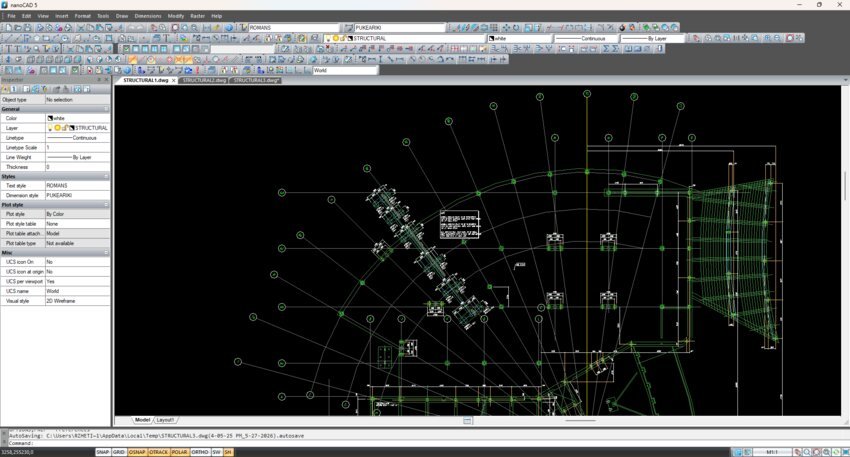
If you have ever opened a DWG file someone emailed you and discovered you had no software that could read it properly, you already understand the appeal of nanoCAD Free. It is a desktop CAD application that you can download, register, and use indefinitely without paying anything — and unlike many “free” tools, it is not a stripped-down viewer. It is the actual fifth version of the nanoCAD platform, released years ago and kept available by its developer, Nanosoft, as a permanent free edition for individuals and businesses working on non-commercial projects.
For anyone new to computer-aided design, here is the short version of what that means. CAD software is how technical drawings get made today: floor plans, machine parts, electrical diagrams, site layouts. Instead of drawing lines on paper, you place precise geometry on a screen, organize it, dimension it, and print or share it. The dominant file format for all of this is DWG, and DWG is exactly what nanoCAD Free uses as its native format. A drawing you create here can be opened in practically any other CAD program, and drawings other people send you will usually open here too.
What you actually get
The toolset is more generous than the price suggests. nanoCAD Free ships with over 450 commands, reachable through menus, toolbars, the command line, or scripts. You get the full kit of 2D drawing primitives — lines, polylines, arcs, circles, splines, rectangles, polygons — plus the editing commands that make drafting fast: trim, extend, offset, mirror, arrays, fillet, chamfer. There is multiline text with proper text styles, a search-and-replace feature, tables that can import and export data, and a complete set of dimension types: linear, radial, angular, and arc. Reusable blocks and external references let you build a drawing from repeated components without redrawing them each time.
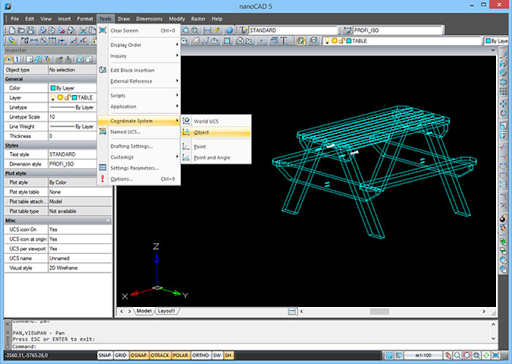
A genuinely useful detail for newcomers is the set of file-safety commands. When you open a DWG from an unfamiliar source, the Audit, Recover, and Purge commands check the drawing for errors, repair what they can, and strip out the junk objects that bloat file size. It is the kind of housekeeping that keeps a project from quietly breaking later.
If you have ever touched AutoCAD, the biggest thing nanoCAD Free has going for it is familiarity. The menus sit where you expect, the icons look like what they do, and the command names match. Nanosoft openly designed it this way so that someone switching over needs almost no retraining. For a small studio or a workshop that cannot justify a subscription, that flat learning curve is worth as much as the price tag. As a genuinely usable free desktop CAD software, it is a sensible first install before spending money on anything heavier.
Two honest limitations: DWG 2018 and advanced layer controls
No free product is free of trade-offs, and nanoCAD Free has two worth knowing about before you commit.
The first is DWG version support. Because this is version 5 of the platform — a release that predates a lot of modern CAD output — it reads and writes the DWG format only up to the 2013 generation. Files saved by AutoCAD 2018 or newer use a later format that nanoCAD Free cannot open. There is a simple way to check before you are caught out: open the DWG in any text editor such as Notepad and look at the first few characters. You will see a code beginning with “AC10” followed by two digits. “AC1032” means the file is in DWG 2018 format and will not load in the free edition. If you regularly receive drawings from people on current software, this single limitation can be the deciding factor — you would either ask them to save down to an older version, or move up to the paid platform.
The second is layer handling. Layers are how a CAD drawing stays organized — think of them as transparent sheets, one for walls, one for dimensions, one for electrical, each able to be shown, hidden, locked, or coloured independently. nanoCAD Free gives you solid, standard layer management: you can create layers, set their properties, and turn them on and off. What it does not include is the advanced layer controls found in the paid platform — tools like Layer Walk for stepping through layers one at a time to see what is on each, Match Layer, Merge Layer, layer states you can save and restore, and per-viewport freezing. On a simple drawing you will never miss them. On a dense, messy file with dozens of layers, those tools are what turn an afternoon of untangling into ten minutes.
The wider nanoCAD family
nanoCAD Free is the entry point to a larger lineup, and it helps to know where it sits. The current commercial product is the nanoCAD 26 Platform, a fully up-to-date CAD package with the modern DWG standard, a ribbon interface, dynamic input at the cursor, associative hatching, parametric 2D design, PDF import and export, and the advanced layer and document tools the free edition leaves out. It is sold on a subscription, and Nanosoft offers a 30-day trial for anyone who wants to compare it directly against version 5.
The Platform can then be extended with specialized modules, each aimed at a particular kind of work. The 3D Solid Modeling module adds direct and parametric solid modeling and sheet-metal tools. Mechanica brings mechanical design with a parametric engine and a library of standard parts. Construction adds IFC support and parametric libraries for architecture and building drawings. Raster handles scanned images, including vectorization that converts raster lines into editable geometry. Topoplan covers digital terrain modeling for surveyors. These are also sold as money-saving bundles — nanoCAD Pro, Mechanica, Construction, and the all-inclusive nanoCAD Max. Separately, there is nanoCAD 3DScan for turning point-cloud scan data into engineering models.
The practical takeaway is reassuring. You can start with nanoCAD Free, learn CAD properly without spending a cent, and produce real 2D drawings. If your work outgrows it — newer DWG files, 3D, or heavier projects — there is a clear, paid path forward that uses the same interface and skills you already built. For a great many hobbyists, students, and small non-commercial projects, though, the free edition is simply enough on its own.

Read Dive is a leading technology blog focusing on different domains like Blockchain, AI, Chatbot, Fintech, Health Tech, Software Development and Testing. For guest blogging, please feel free to contact at readdive@gmail.com.